This post follows the two previous ones.
After understanding that everything is a computer and that everything is software, I grasped one last thing that really changed how I see the internet, and this is what this article is about.
Communicating at a distance Link to heading
Since time immemorial, humankind… has sought to automate tasks. That’s probably even one of the fundamental goals of technology. So it’s no surprise that in fields where you need to perform a lot of mathematical operations like multiplications or divisions, people have been quite happy to welcome technologies capable of doing those tasks for them.
The ultimate technology for those jobs is, of course, the computer. By implementing algorithms and running programs, a computer can calculate almost anything, give you the answer much faster, and with far better reliability.

After seeing that computers could calculate very well, people realized they could enable a huge number of additional tasks: displaying text, images, graphical interfaces; storing large amounts of data in an organized, easily accessible way; and performing lots of operations on that data quickly.
Very useful, these computers. One fine day, someone got tired of hauling hard drives from one computer to another and wondered whether there wasn’t a way to let them communicate with each other directly.
The Wild West Link to heading
“How?” you might ask, well, we can draw on the rudimentary ways people communicated back then. The imagery of the Wild West is quite handy for illustrating this.
There were written communications, like handwritten or printed letters carried from one place to another. There were also Indigenous peoples, who communicated over long distances by lighting fires and creating smoke signals.

And then there were the American settlers, who had a solid technological lead and could communicate with the telegraph. They laid electrical cables all along their route and connected a device that could generate an electrical current on the line and another that went “beeeep” when it detected an electrical current.

That last method is really interesting because it involves electricity, which is great because computers work very well with electricity, so let’s focus on that!
So we can make a device go “beeeeper” several kilometers away. Great but how do we send a message like “Hello” for example?
This problem is actually similar for smoke signals. And that’s where you’ll think of Morse code, of course! You send long beeeeep and short beep. Each letter of the alphabet and each digit corresponds to a different sequence of long beeeeep and short beep. You separate each character with a pause, and there you go!
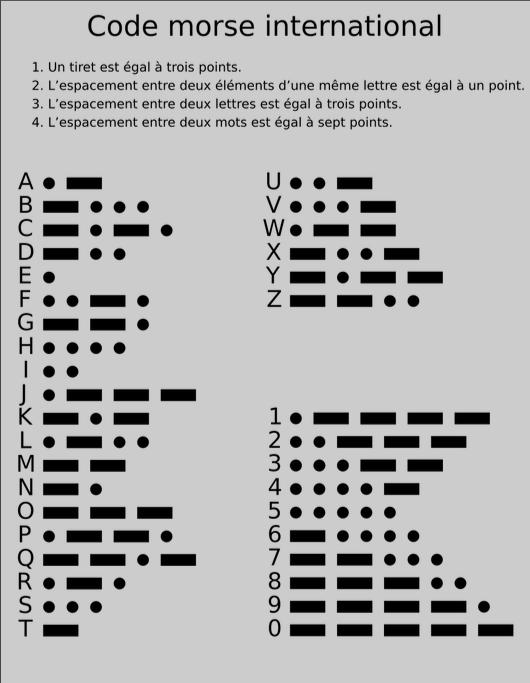
With nothing but a humble beep as your tool, you can actually communicate very complex messages.
Now, it’s easy to imagine that instead of a device that goes beep beep, a computer could be equipped with a component that detects an electrical current, picks out the long and short beeps, and decodes the Morse code sent by another computer which would itself be connected to a device that emits an electrical signal.
Once you’ve set something like that up, a computer can easily send a message to another computer. They could even easily exchange messages like in a messaging app, the possibilities are endless!

Modern methods Link to heading
Now that we’ve seen this example, it has to be said that today the methods for sending information from one computer to another are much more complex and efficient.
Wired methods Link to heading
As in the old days, we still use a lot of wires or cables to carry information. Only now, it’s no longer just beeeeep that we’re transporting!
Where the Morse telegraph transmitted information through an electrical current passing into a speaker, today the information lives in an electromagnetic wave traveling through electrical wires and that can be picked up with voltmeters measuring the value of the electrical voltage. An “electromagnetic wave” is basically light! But in this case, not visible to the naked eye.
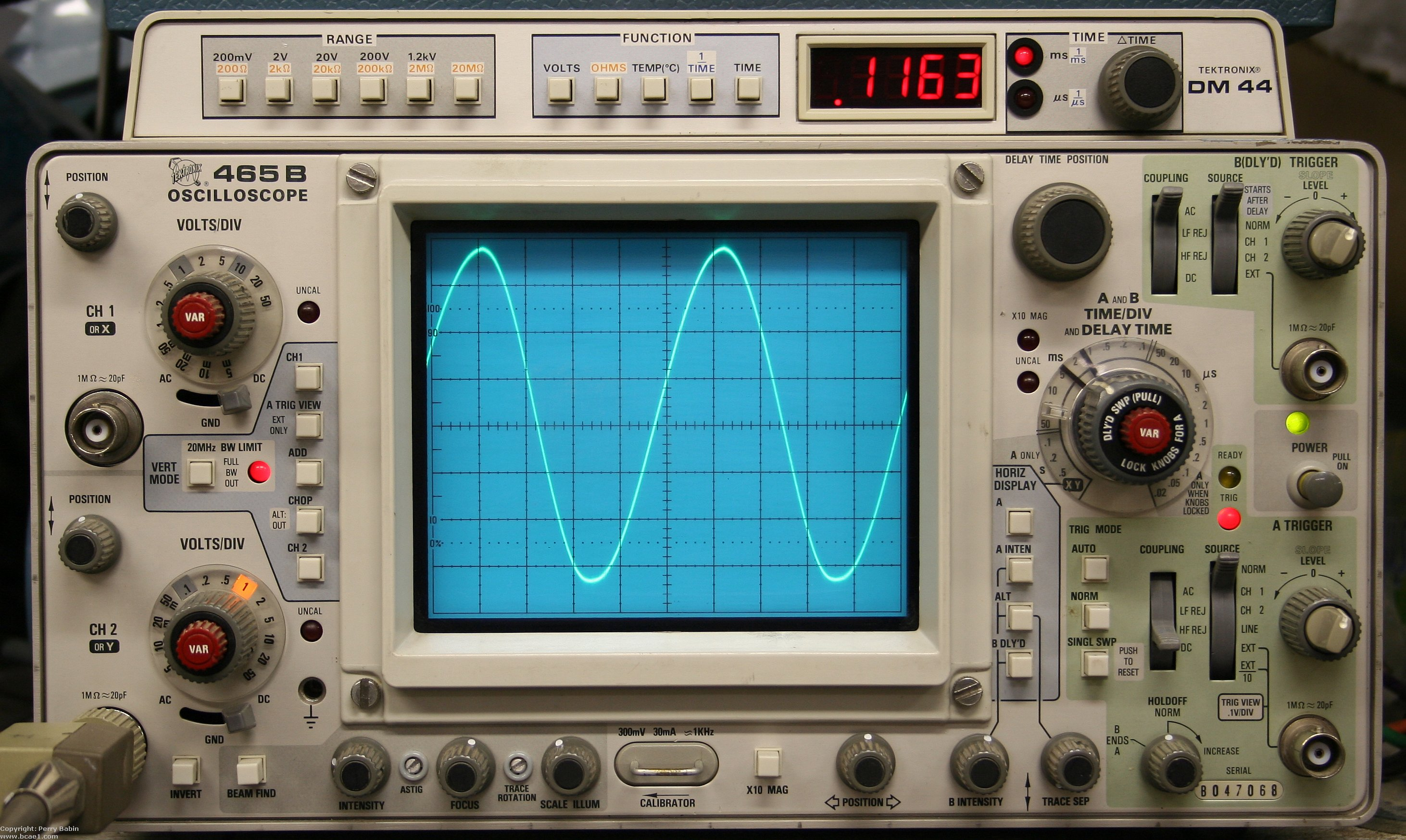
There’s a whole range of techniques for carrying information with a wave, typically by changing its intensity, its phase, or its frequency, and it’s a very rich and rather fascinating field of research. To go further, I’d recommend the resources from Deus Ex Silicium, which from what I’ve seen look very good.
Here’s an example of how you can transmit 2 bits of information by changing the phase of a wave:
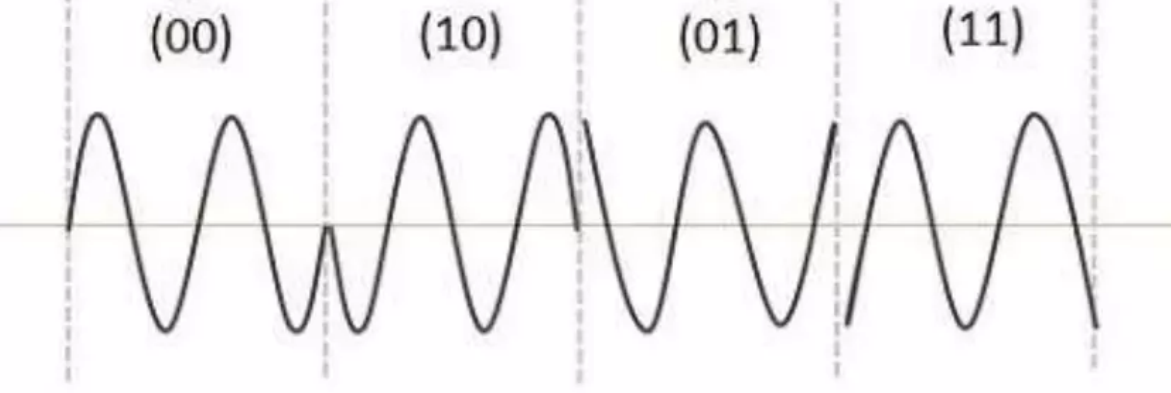
Advance by 1/2 phase, then go back by 1/4, then advance by 1/4
These techniques show up in ADSL, Ethernet cables, HDMI, USB, and so on. In general, when you plug a cable between two devices to make them “communicate,” well, that’s how they communicate.
There’s also fiber optic technology, which carries an electromagnetic wave very similar to visible light and instead of sending it through metal wires, you send it through a “fiber optic” cable, which is basically a glass thread. The advantage is that the wave is much less attenuated and disturbed when it travels through a medium like that, so you can increase the throughput.
The downside is that it costs more, which is why it isn’t everywhere.
Wireless methods Link to heading
Now that we’ve seen wired methods, you’re probably wondering about wireless.
You surely use Wi-Fi (Wireless Fidelity), 4G, or 5G. Those also carry electromagnetic waves, but not through an electrical cable or a fiber optic line, through the atmosphere… Plain and simple! The wave travels from one antenna to another.
It may seem odd that this can work, and you might ask: “So why bother with cables if we can just emit them like that?” The answer is that in the atmosphere, electromagnetic waves are heavily disturbed and attenuate quickly which is why we still choose cables in many cases.
By the way, I say “in the atmosphere” but electromagnetic waves also travel very well through space, as space probes, GPS satellites, and so on show… And so it may seem even stranger, but unlike a sound wave which corresponds to the displacement of molecules and therefore exists within a material medium, electromagnetic waves are a disturbance of an electric field and a magnetic field that sustain each other and propagate through space, not through any specific medium.
An antenna is concretely a bar of conductive metal connected to an electrical wire. I know that can seem surprisingly simple, and explaining in detail why it works would make this blog post a bit too long but I warmly recommend the videos from the ScienceClic channel: The electromagnetic field and Electromagnetic waves if you want to understand in more detail. The link is for their videos in french but I think they have a channel in english as well ;)
What you need to understand is that the electrical signal (which takes the form of a wave) will be translated by the antenna into an equivalent electromagnetic wave that propagates in all directions.

You can go play with this radio wave simulation that I find fun and that might help you build a better mental picture of what’s going on.
Key takeaways Link to heading
Let’s summarize what we said above:
-
Like the telegraph in Wild West times, you can make a device go beeeeper by sending an electrical signal (a variation in electrical voltage) through a conductive wire.
-
Starting from a simple beeeep, depending on whether you make it longer or shorter, you can agree on a correspondence between short beeps and long beeeeep and the alphabet, and then you can actually transmit complete sentences.
-
Today, instead of beeps, we use electromagnetic waves whose frequency, phase, or intensity we change to transmit information. These electromagnetic waves can travel through copper wires (ADSL, HDMI, USB, Ethernet, etc.), fiber optic cables, or simply through space, very handy, but throughput is a bit limited over long distances.
-
Computers can detect all these signals and be programmed to receive them, interpret them, and emit them.
Building a network Link to heading
The post office analogy Link to heading
Maybe you’re too young to have really used the services of La Poste (the French postal service). I know that for my part, I’ve never done much other than send postcards or administrative documents. But an analogy with La Poste (and its counterparts in other countries) will help us build an intuition for how information is carried within computer networks.
Let’s take the example of a letter addressed to the President of the French Republic from within France, because thanks to postal privilege, you won’t have to pay for it!
You would write your letter to the President, then fold it and put it in an envelope. Then, according to this website, you need to indicate the recipient and their address (the Élysée Palace, of course) like this:
Monsieur le président de la République
Palais de l’Élysée
55 rue du Faubourg-Saint-Honoré
75008 Paris
And you’ll drop the whole thing in a mailbox.
I’d like you to understand two concepts: the concept of a protocol and the concept of hierarchy.
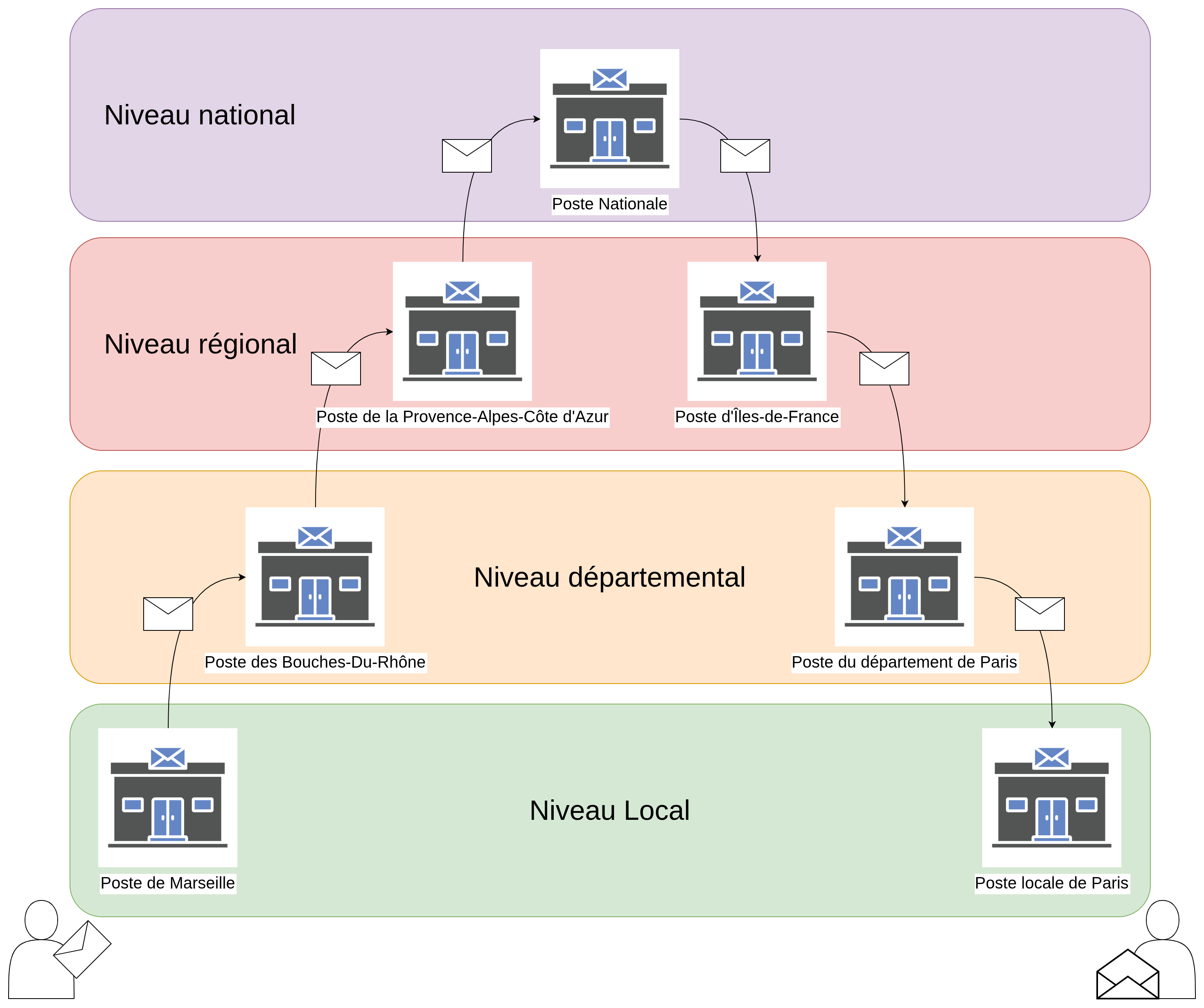
See below the step-by-step journey of your letter when it’s sent from Marseille to arrive in Paris:
Hierarchy Link to heading
The way I organized the diagram makes it obvious, but we can clearly distinguish 4 levels of letter delivery: local, departmental, regional, and national. These levels don’t represent the actual French postal circuit, it’s just a logical, intuitive way to build such a circuit, and it’ll be very useful for our analogy ;)
So there’s the top of the hierarchy, namely the national level (if we wanted to imagine the postal system for the entire Earth, we could even imagine an international level, but let’s stick to France). From the national level, you can zoom in on any region, then any department in that region, then any city or village in that department, then any address or street in that city/village.
Each higher level encompasses all the lower levels, and we talk in terms of levels to simplify processing. There are roughly the same number of entities to manage at each level: the national level manages ~18 regions, each region manages ~6 departments (since there are 101 departments in total), each department manages ~346 cities/municipalities, and so on. We get that instead of having the national level manage tens of thousands of cities.
We also notice that the addressing on our letter designates precisely these different levels:
| Letter | Level |
|---|---|
| Monsieur le président de la République | Personal |
| Palais de l’Élysée | Local |
| 55 rue du Faubourg-Saint-Honoré | Local |
| 75008 Paris | Local and departmental |
Here is the list of the first few cities in France in alphabetical order:
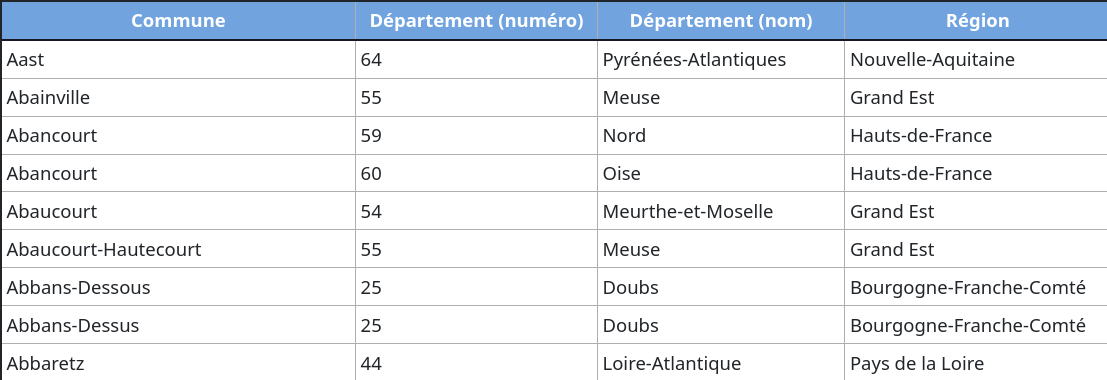
We see that there are cities with the same name that can be differentiated by their department or region, therefore at higher levels. In the same way, there are cities in the same department but with different names.
Protocol Link to heading
At each level, we have a post office or sorting center responsible for reading the address on the letter and asking the following question: “Is the final destination at a level below mine?”
- If the answer is no, the post office will simply send it to the next level up without asking any further questions. For example, the post office of Bouches-du-Rhône that receives a letter destined for an address in Brittany, Occitanie, or Normandy doesn’t need to know the address with any more precision to know it can’t deliver it so it sends it straight to the national post office.
- If the answer is yes, the post office will need to route the letter to the most relevant post office at the lower level. If the post office of Bouches-du-Rhône receives a letter destined for an address in the city of Aix-en-Provence (next to Marseille), then it will need to send it to the local post office of Aix-en-Provence.
Let’s continue with the example I gave.
We require all mail senders to indicate on their envelope:
Address:
	Level 0: <street>
	Level 1: <city>
	Level 2: <department>
	Level 3: <region>
	Level 4: <country>
Imagine a level-2 post office, i.e. departmental (let’s say Bouches-du-Rhône). It can send a letter to the post offices of all the cities within it listed in the variable city_list, and it can send a letter to the regional post office, regional_post_office, in which it sits. When it receives a letter, it performs the following work:
Regional_Post_Office = 'POSTE_PACA'
Local_Post_Offices  = ['Aix-en-Provence', 'Allauch', 'Alleins', ...]

Read level1
IF:
	Level1 IS IN Local_Post_Offices:
		SEND TO Level1
ELSE:
	SEND TO Regional_Post_Office
This program example applies to all other departments, but also to post offices at the regional level.
And there you go: we’ve just defined entities, senders and post offices, conditions that senders must meet, and programs that post offices must execute. Well, we call this kind of system a protocol.
We could improve our protocol, for example by adding entities like recipients, mail carriers, registered letters, and so on, each with programs to execute and conditions to meet. We could also add specific cases: what to do when a level of an address isn’t filled in? What to do if the street doesn’t exist or no longer exists? What to do if the letter was lost along the way?
And we add all these special cases to the program of the entities in our protocol.
All telecommunications rely on protocols, for example the HTTP protocol you use to browse a website. The HTTPS protocol, which was built on top of the HTTP protocol but adds encryption for more security. The WiFi or Bluetooth protocol, as well as 3G, 4G, 5G, and so on…
Back to computing Link to heading
It turns out our post office analogy is very close to what happens with computers.
First, the physical transfer of the letter by postal workers corresponds to the physical transfer of data through cables or radio waves, as I explained above.
Then, from the point of view of transferring data from one place to another, computers are organized hierarchically, just like departmental or regional post offices. The phone or laptop you hold in your hands is at the very bottom of the hierarchy (unless you’ve configured it in a particular way); your internet router is one level up; then there are many other routers at higher levels that can talk to all the routers in a neighborhood, then a city, then a department… and so on. We generally talk about networks and subnetworks.
Each of these higher-level computers (which we generally call routers) is programmed to follow the internet protocol called TCP/IP: Transmission Control Protocol/Internet Protocol.
Each computer has an address that identifies it relative to all the others on the network. That’s the famous IP address. Just like cities in France, some computers have the same addresses but not in the same subnetworks, which means we can still tell them apart. Some are in the same subnetworks but with different addresses, and so on… Each computer has, if not a unique address, a unique set of addresses.
Anatomy of a local network Link to heading
Without going into infinite detail, we can quickly dissect my local network, the one I already talked about in My Setup.
We can see that I have my Freebox Pop (which is a computer acting as a router) connected by fiber optic, and that it’s linked by cable to my computer (my homelab) and by electromagnetic waves following the WiFi protocol to several other devices.
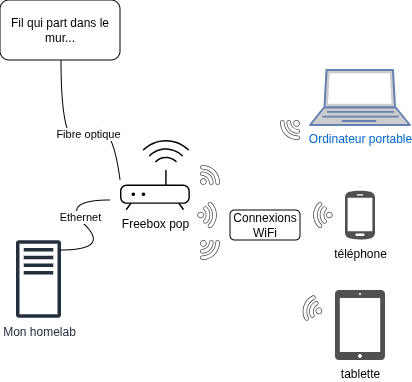
As you can probably guess, my Freebox is connected by fiber optic to my neighborhood’s router, which is hierarchically above it.
When we look at the configuration of these devices, we see that they all have an IP address and we notice that these IP addresses all start with 192.168. That’s actually the prefix for many subnetworks, whether at my place or yours ;)
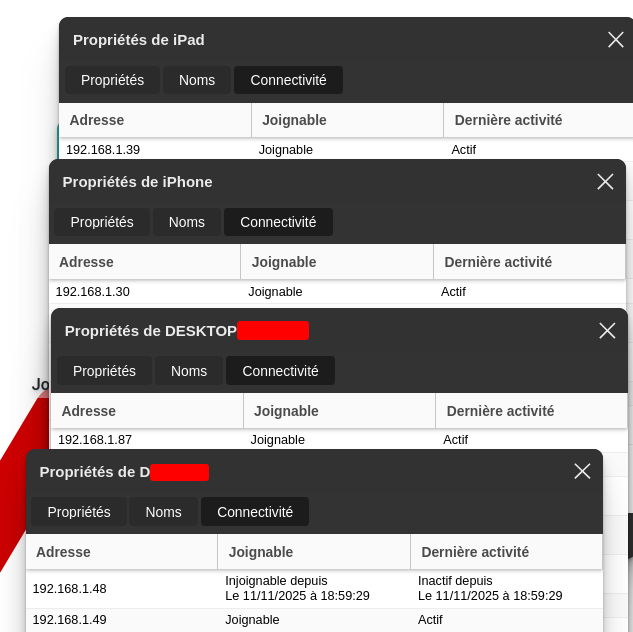
Let’s analyze a transmission from one device on my network to another. The information transfer will be what we call a ping, or more technically, an ICMP request. ICMP is a very simple protocol; it lets computers that follow it quickly and easily verify that they’re connected. It’s a bit like one computer saying “Hey, are you there?” and the other answering “Yes, I’m here!” and that’s it.
Here’s what I can see in Wireshark, a software that lets you analyze information exchanges on a network, when I use my computer to ping the iPad:
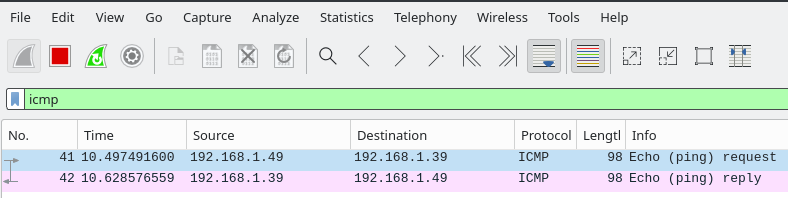
With this software, we can see which bits my computer receives and how it interprets them.
If we analyze one of these transmissions, we see that they’re made of 0s and 1s, just as we’ve always said!
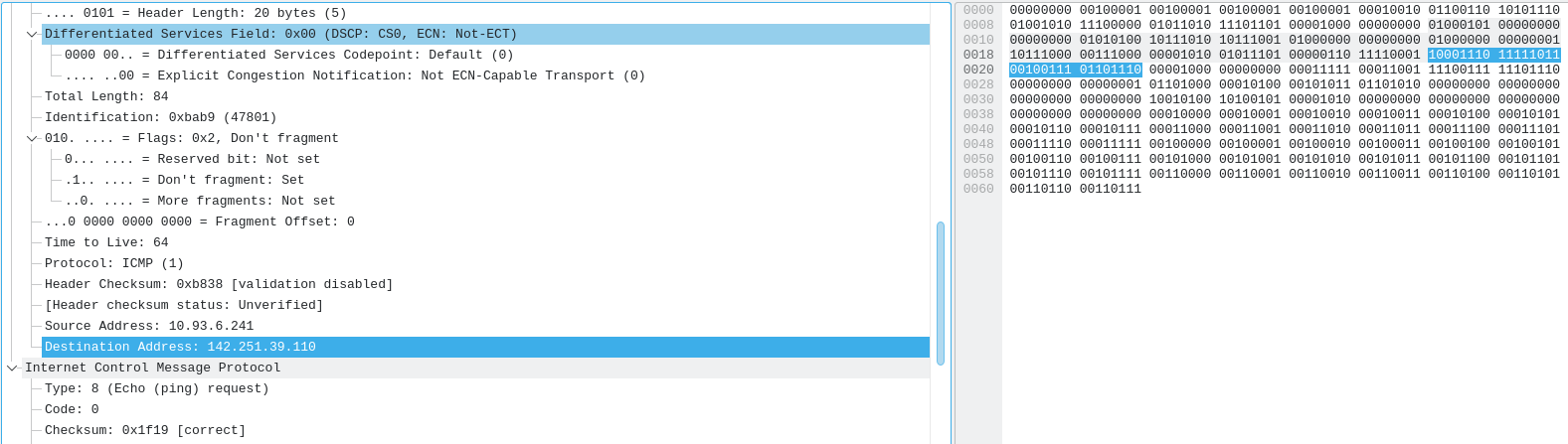
And we see that these 0s and 1s correspond to useful information. For example, some bits indicate the type or version of the protocol, others indicate the address, others (like checksums) indicate that the information wasn’t altered during transmission, and so on…
Conclusion Link to heading
That’s all for today! I hope that by reading this article you’ve understood that:
- The internet is computers transferring data to each other;
- These data transfers are electromagnetic waves traveling through wires or through space;
- Thanks to these data transfers, you can send information directly from one computer to another;
- By organizing several computers into a network, you can send information from any one of these computers to any other, no matter the distance, by routing the information through intermediate computers called routers;
- These routers are organized hierarchically to maximize transfer efficiency, in terms of speed and reliability;
- All the computers on the network follow the same protocol which is a set of constraints on the messages to send, and a set of operations to execute depending on the messages received;
- To come full circle: the internet is all the computers in the world transferring data to each other thanks to electromagnetic waves and common network protocols that maximize the efficiency and speed of transfer!
If you’ve understood all of that, that’s great! You can refine your understanding by tinkering with your own computers. Ask yourself how your computer or phone is sending or receiving data right now: WiFi? 4G/5G? A cable? In your opinion, how many computers does the message you’re sending pass through? Is the protocol the same all along the chain?
It took me forever to finish writing this article, I’m really glad I got there! Except there’s actually still one more part left, which I’ll try not to take as long to publish x) anyway, bye!